

AI in modern cameras is changing how photographers capture sharp images, especially when photographing moving subjects. Traditional autofocus systems can focus quickly, but keeping a person running toward the camera, a bird flying across the frame, or a child moving unpredictably in focus can be challenging.
AI-powered autofocus helps by recognizing subjects, identifying important details, and tracking movement. Depending on the camera, it can detect human eyes, recognize animals and birds, and follow vehicles or other supported subjects as they move through the frame.
However, AI autofocus is not infallible. It can lose track of a subject, select the wrong person in a crowd, or struggle in low light. Understanding both its capabilities and limitations will help you use it more effectively.
1. What Is AI Autofocus?
AI autofocus is a camera focusing system that uses machine-learning models or other intelligent recognition techniques to identify subjects and help maintain focus on them.
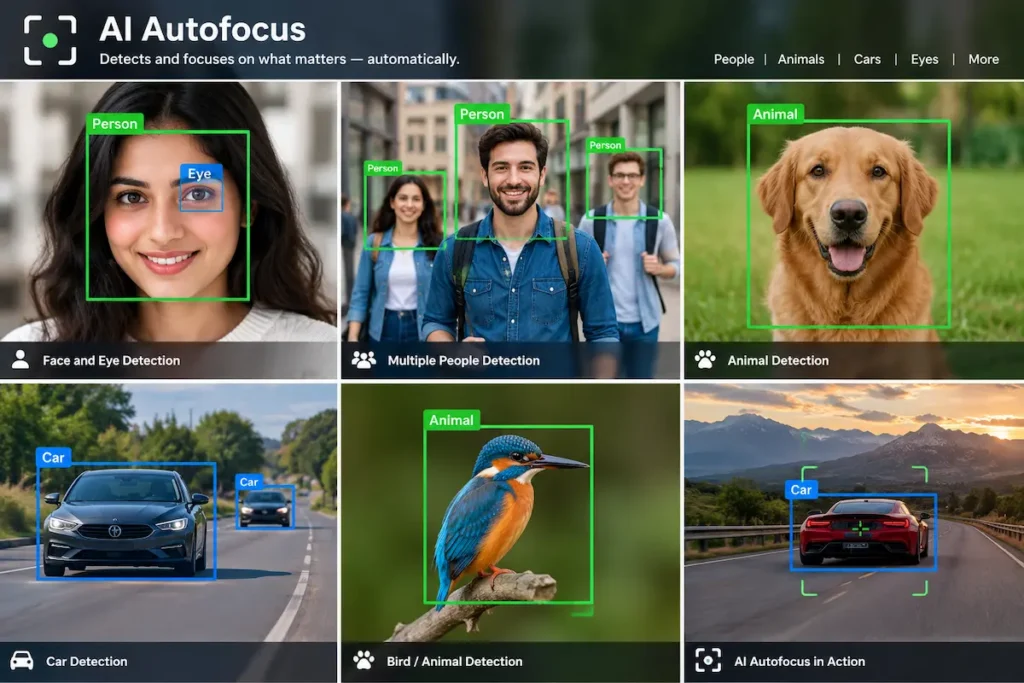
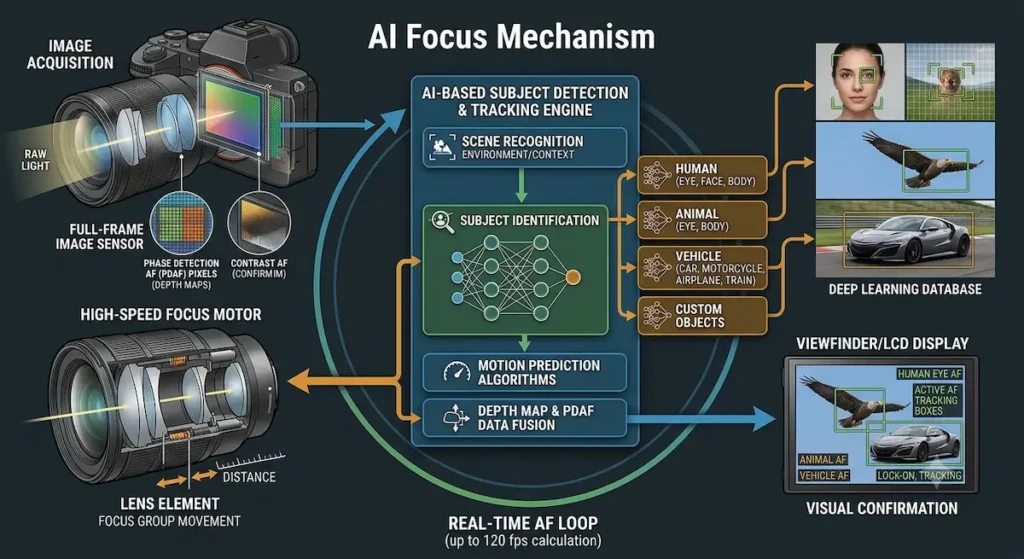
Traditional autofocus systems determine focus using image information, such as phase differences or contrast. Many modern cameras combine these focusing methods with subject recognition to improve tracking.
For example, when photographing a person, the camera may recognize the face and eyes rather than focusing on the background. If the person turns their head, the camera may continue tracking them and reacquire an eye when it becomes visible.
How AI autofocus works
Although the exact process varies by camera model, the general workflow involves five steps:
- Scene analysis: The camera analyzes image information from its sensor.
- Subject recognition: Its recognition system identifies supported subjects, such as people, animals, birds, or vehicles.
- Focus selection: The camera identifies the subject or detail that should receive focus priority.
- Subject tracking: It updates the subject’s position as the scene changes.
- Focus adjustment: The autofocus system moves the lens elements to maintain focus as the subject’s distance changes.
These operations happen rapidly, allowing the camera to respond to movement.
Example: Imagine photographing a football player running toward you. As the player’s distance changes, the camera must continuously adjust focus. AI subject recognition helps it identify the player and track them instead of switching to spectators in the background.
AI recognition and autofocus are related but different. AI helps identify and track the subject, while the autofocus system controls the actual focusing process.
2. AI Autofocus vs. Traditional Autofocus
Traditional autofocus is not necessarily slow or inaccurate. Professional cameras have used sophisticated tracking systems for years. The main difference is how newer systems use subject recognition to help make focusing decisions.
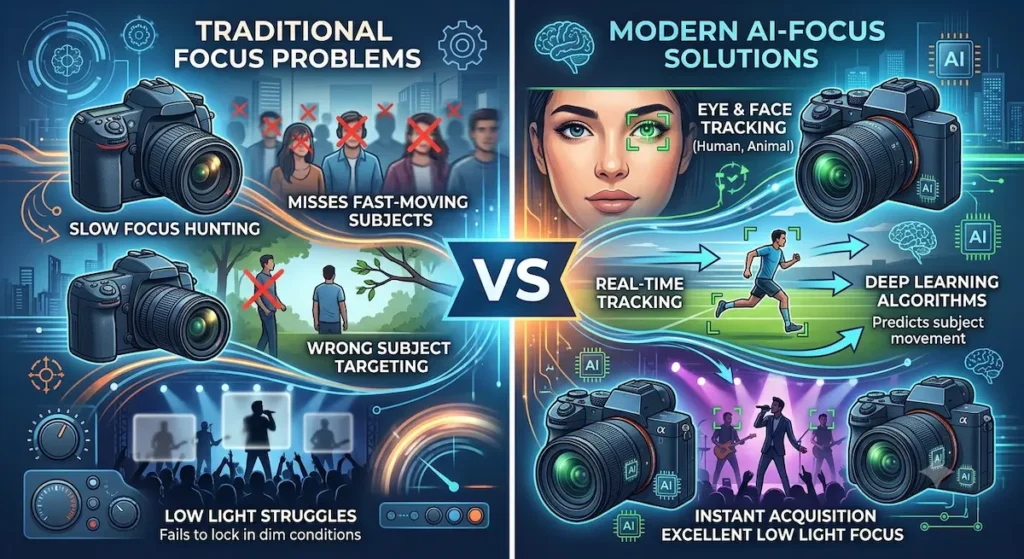
| Feature | Traditional autofocus | AI-powered autofocus |
|---|---|---|
| Subject identification | Uses focus and image information; some systems include face detection | Can recognize specific subject categories |
| Eye detection | Depends on the camera’s capabilities | Often provides advanced eye recognition |
| Animal recognition | May require manual focus-point selection or conventional tracking | May recognize supported animals automatically |
| Moving subjects | Tracks using focus and motion information | Combines tracking with subject recognition |
| Subject selection | May require more manual input | Can reduce manual selection |
| Performance | Depends on the autofocus system | Depends on recognition, tracking, lens, and camera performance |
The distinction is not absolute. Some older cameras already have face detection and subject tracking, while some modern AI systems work alongside conventional autofocus rather than replacing it.
3. How AI Eye Detection Autofocus Works
Eye detection is one of the most useful autofocus developments for portrait photography. Instead of simply detecting a face, the camera identifies an eye and attempts to keep it in focus.
This matters because, particularly at wide apertures, the depth of field can be shallow. A small focusing error may make the eyes look soft even when the rest of the face appears reasonably sharp.
Example: Photographing a portrait
Suppose you are photographing a person outdoors using these settings:
- Aperture: f/1.8
- Shutter speed: 1/500 second
- ISO: 200
- Autofocus mode: Continuous autofocus
- Subject detection: Human eye detection
At f/1.8, focusing on the person’s ear instead of the nearest eye can produce a noticeably soft portrait.
With eye detection enabled, the camera can identify the eye and help maintain focus as the person moves slightly or changes their head position.
Practical tip: Use eye detection with continuous autofocus when photographing people who may move. Check the selected eye in the viewfinder, especially at wide apertures.
Limitation: Eye detection may fail when the face is turned away, the eyes are hidden by hair or glasses, or the subject is too small in the frame. Some cameras also struggle when multiple faces overlap. In these situations, select the subject manually or use a suitable focus area.
4. AI Animal and Bird Detection
Wildlife photography often involves subjects that move quickly, change direction, or remain partially hidden. AI subject recognition can help the camera distinguish an animal from its surroundings.
Depending on the model, supported subjects may include dogs, cats, birds, horses, and other wildlife. Some cameras can prioritize an animal’s eye, while others may recognize only the animal’s body.
Example: Photographing a bird in flight
Imagine photographing a bird flying across a lake. The bird moves quickly, and the background contains water, trees, and reflections.
Try these settings:
- Autofocus mode: Continuous autofocus
- Subject detection: Bird, if supported
- Shutter speed: 1/2000 second
- Aperture: f/5.6
- ISO: Auto ISO
- Drive mode: High-speed continuous shooting
The fast shutter speed helps freeze movement, while continuous autofocus adjusts focus as the bird’s distance changes. Bird recognition helps the camera identify the bird and may prioritize its eye or body.

Practical tip: Keep the bird within the autofocus tracking area. If the camera loses it against a complicated background, use a smaller zone or temporarily select a focus point manually.
Limitation: Small, distant birds may occupy too few pixels for reliable recognition. Fast, erratic movement, branches in front of the bird, poor light, and similar-looking background details can also confuse tracking. AI cannot compensate fully for an unsuitable shutter speed or a lens that cannot focus quickly enough.
5. AI Autofocus for Sports and Action Photography
Sports photography requires the camera to respond to unpredictable movement. A player may sprint toward the camera, jump, turn suddenly, or become hidden behind another player.
AI subject recognition can help maintain focus on a selected person or vehicle while the autofocus system responds to changes in distance.
Example: Photographing a football match
Suppose you want to photograph a football player dribbling toward the goal.
Start with these settings:
- Autofocus mode: Continuous autofocus
- Subject detection: Human or athlete, if available
- Shutter speed: 1/1000 second
- Aperture: f/2.8 or f/4, depending on the lens and available light
- Drive mode: High-speed continuous shooting
Select the player you want to follow and keep them within the tracking area. The camera can use subject recognition to help distinguish that player from other people on the field.
If another player crosses in front, the camera may continue tracking the original subject, depending on its tracking settings and recognition performance.
Practical tip: For crowded sports scenes, adjust subject-switching or tracking sensitivity if your camera offers these controls.
Limitation: AI may switch to another player when subjects overlap or when the original subject disappears behind an obstruction. It also cannot predict every sudden movement or guarantee that every frame in a burst will be sharp. Anticipating the action and choosing an appropriate shutter speed remain essential.
6. AI Autofocus in Video Recording
AI-powered autofocus is useful when recording video because subjects may move toward or away from the camera, turn around, or temporarily leave the frame.
Modern cameras can use face and eye detection to maintain focus during these changes. Some also recognize animals and vehicles.
Example: Recording a walking interview
Imagine recording a person walking toward the camera while speaking.
Try these settings as a starting point:
- Video resolution: 4K
- Frame rate: 25 fps
- Shutter speed: 1/50 second
- Aperture: f/2.8 to f/4
- Autofocus mode: Continuous autofocus
- Subject detection: Human face or eye detection
The camera can track the person’s face or eyes while adjusting focus as the distance changes.
For natural-looking video, focus transition speed and subject-tracking sensitivity may matter as much as recognition accuracy. If focus shifts abruptly between the person and the background, reduce focus transition speed or adjust tracking sensitivity when available.
Limitation: Rapid focus changes can distract viewers, while low light and partial obstructions can cause focus hunting. A camera may also focus on the wrong person when several people appear in the frame. For controlled interviews, manual focus or a carefully tested autofocus setup may be more reliable.
7. AI Subject Recognition and Focus Area Selection
Subject recognition works best when combined with an appropriate autofocus area. The camera must recognize the subject and track it within the frame.
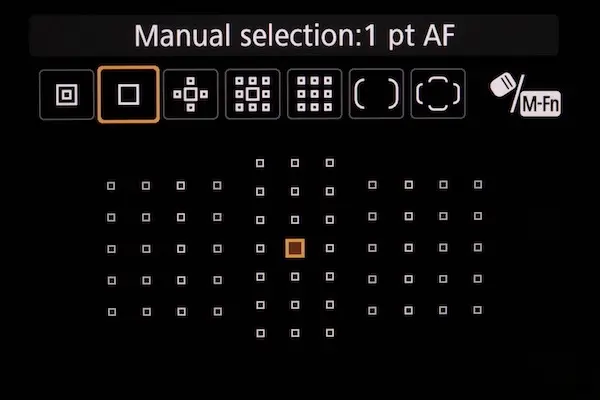
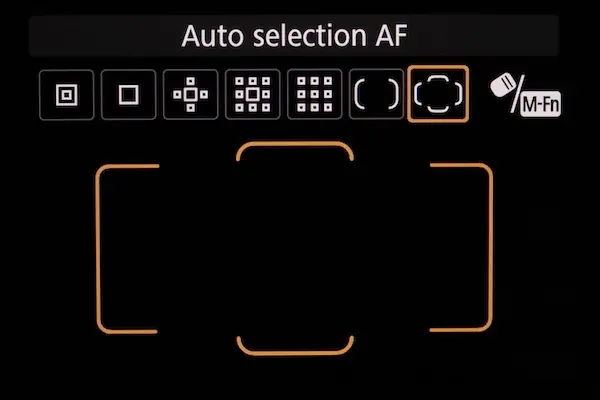
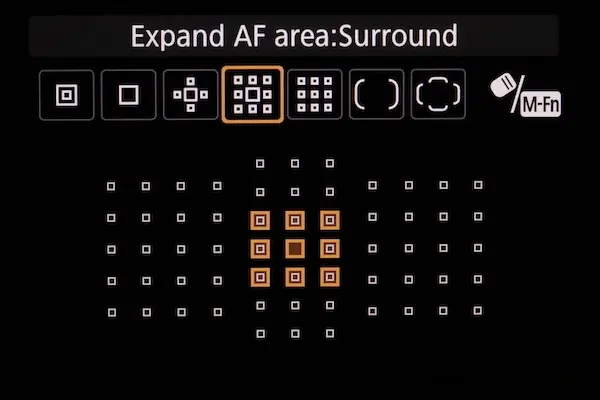
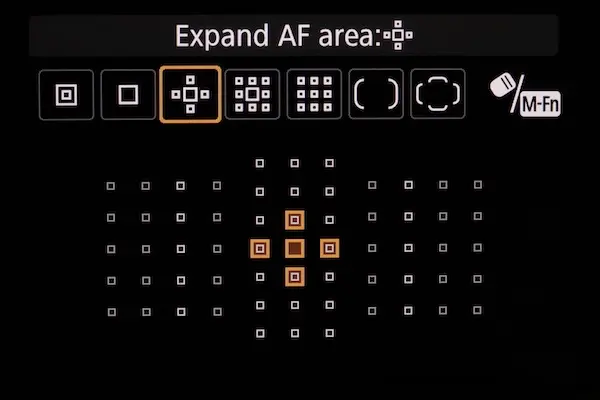
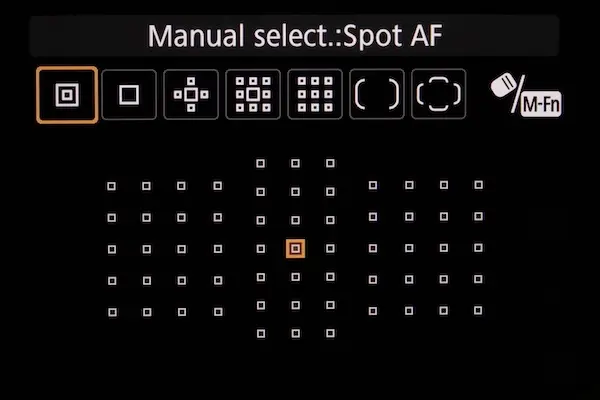
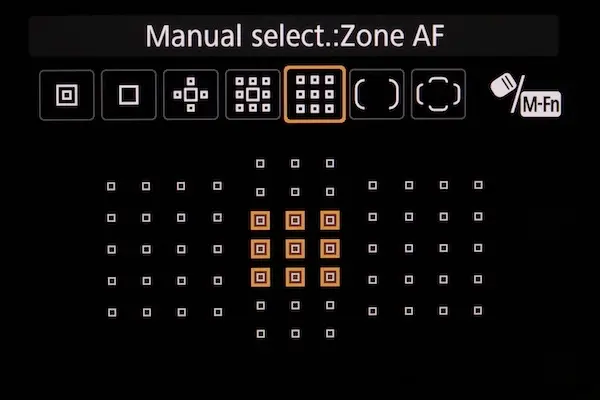
Common focus-area options include:
- Wide area: The camera searches across a large portion of the frame.
- Zone area: The camera focuses within a selected region.
- Tracking area: The camera follows a selected subject as it moves.
- Single-point area: The photographer chooses a specific area for precise focusing.
The names and functions vary by manufacturer.
Example: Photographing a person in a crowded street
Suppose you are photographing one person walking through a crowded market. If the camera uses a wide area, it may detect another face and switch subjects.
To improve your results, select the person using the tracking system or begin with a zone positioned around them. AI recognition can then help track the selected person.
For a stationary portrait, a wide focus area may be convenient. For a crowded scene, a smaller zone or deliberate subject selection may provide greater control.
Practical tip: When several subjects compete for attention, do not assume the camera will always select the one you intend to photograph. Use subject selection to guide it.
8. Quick Settings Cheat Sheet for AI Autofocus
The following settings are starting points, not universal rules. Adjust them for available light, subject movement, lens capability, and your camera’s autofocus options.
| Photography situation | Autofocus mode | AI subject detection | Starting shutter speed | Additional guidance |
|---|---|---|---|---|
| Stationary portrait | AF-S / One-Shot or AF-C for movement | Human eye | 1/125 sec | Use a wide aperture if you want a blurred background |
| Moving person | AF-C / Servo | Human eye | 1/500 sec | Use subject tracking |
| Bird in flight | AF-C / Servo | Bird, if supported | 1/2000 sec | Use burst shooting and a suitable tracking area |
| Wildlife at rest | AF-C for movement or AF-S for a stationary subject | Animal or bird | 1/500 sec | Adjust shutter speed for movement and focal length |
| Football or other sports | AF-C / Servo | Human or athlete | 1/1000 sec | Use burst shooting and adjust for fast action |
| Walking interview | Continuous AF | Human face or eye | 1/50 sec at 25 fps | Adjust focus transition speed for smoother video |
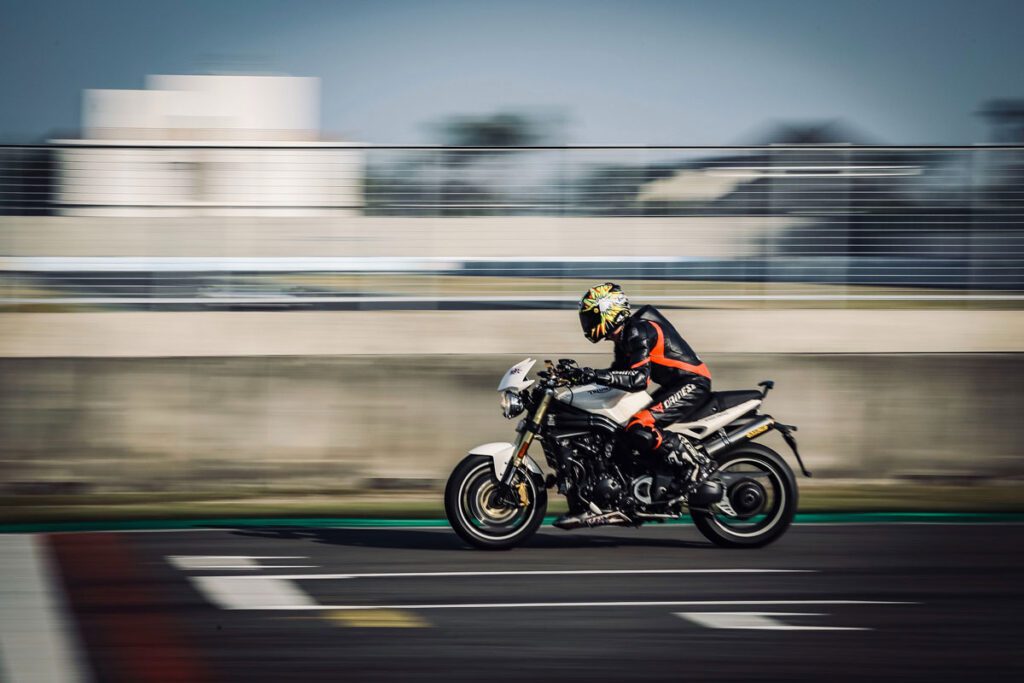
| Moving vehicle | AF-C / Servo | Vehicle, if supported | 1/1000 sec or faster | Adjust for vehicle speed and panning technique |
| Product photography | AF-S / One-Shot for a stationary product | Usually unnecessary | 1/125 sec or as needed | Use a specific focus point for critical details |
AF-S and One-Shot are common names for single autofocus, while AF-C and Servo commonly refer to continuous autofocus. The exact terminology depends on the manufacturer.
For video, the shutter speed of approximately twice the frame rate is a common starting point for natural-looking motion. It is not a requirement for every creative style.
A quick rule to remember
- Stationary subject: Use single autofocus when appropriate and select the important detail.
- Moving subject: Use continuous autofocus and enable relevant subject recognition.
- Fast action: Combine continuous autofocus with a fast shutter speed and burst shooting.
- Crowded scene: Select the intended subject and use a suitable tracking area.
- Video: Use continuous autofocus and adjust focus transition settings if available.
9. How to Set Up AI Autofocus on Your Camera
The exact menu names vary by brand and model, but the general procedure is similar across many modern mirrorless cameras.
Step 1: Open the autofocus menu
Find the camera’s autofocus or AF settings menu. Look for options such as subject detection, subject recognition, face detection, or eye detection.
Step 2: Select the subject type
Choose the category that matches your photography:
- Human for portraits
- Animal or bird for wildlife
- Vehicle for supported motorsports or transport subjects
Not every camera supports all categories.
Step 3: Enable continuous autofocus when needed
Select continuous autofocus, often called AF-C or Servo AF, for moving subjects. This allows the camera to keep adjusting focus as the subject moves.
For a stationary subject, single autofocus may be more appropriate.
Step 4: Choose a suitable focus area
Select a wide area, zone, or tracking area based on the scene. If your camera supports subject selection, use it when multiple people or objects compete for attention.
Step 5: Test the system
Photograph a moving subject and review the results. Check whether the intended subject remained in focus and whether the camera switched to another subject unexpectedly.
Repeat the test with different focus areas or tracking settings if necessary.
10. Practical Autofocus Tests You Can Try
You do not need an expensive lens or professional subject to understand how AI autofocus behaves. A few simple experiments can reveal what your camera does well and where it needs help.
Test 1: Eye detection with a moving person
Ask a friend to stand several metres away and slowly walk toward you.
- Enable human eye detection.
- Select continuous autofocus.
- Use a moderately wide aperture, such as f/2.8 or f/4.
- Take a series of photographs as the person approaches.
- Review the images at 100% magnification.
Check whether the eye remains sharp throughout the sequence. Repeat the test with eye detection disabled, if possible, to compare the results.
Test 2: Animal detection with a pet
Photograph a dog or cat moving across a room or garden.
- Enable animal detection if supported.
- Use continuous autofocus.
- Choose a shutter speed fast enough to reduce motion blur.
- Take several photographs while the animal moves.
- Check whether focus stays on the animal, especially its eyes.
If recognition fails, try improving the light, simplifying the background, or selecting the animal manually.
Test 3: Tracking a subject against a busy background
Ask a person to walk across a scene containing trees, people, or other distracting details.
- Enable subject recognition.
- Select the person using the camera’s tracking system.
- Keep the person within the tracking area.
- Photograph the person as they move across the frame.
- Check whether the camera continues following the selected subject.
This test is useful for learning how well your camera handles competing subjects.
11. Limitations of AI Autofocus: What Photographers Should Know
AI autofocus can improve focusing consistency, but it does not guarantee sharp photographs. Its results depend on recognition accuracy, the camera’s conventional autofocus system, lens performance, lighting, and the photographer’s settings.
1. Recognition is not always accurate
A camera may mistake one subject for another, fail to detect an eye, or select a different person in a crowd. Recognition may also be less reliable when the subject is small, partially hidden, or viewed from an unusual angle.
What to do: Select the subject manually, adjust the focus area, or use a single focus point when recognition fails.
2. AI cannot overcome every low-light problem
In dim conditions, the camera may struggle to identify a subject or measure focus reliably. Noise, low contrast, and slow lens performance can make focusing more difficult.
What to do: Add light when possible, use a wider aperture, choose a suitable focus area, and increase ISO if necessary to maintain an appropriate shutter speed.
3. Subject tracking can fail during obstruction
If a person disappears behind a wall or another player, the camera may lose the subject or switch to something else. Some systems recover quickly; others may require the photographer to select the subject again.
What to do: Use tracking settings suited to the scene and be ready to reacquire the subject.
4. AI cannot freeze motion
Autofocus and motion control solve different problems. A camera can focus accurately on a runner’s face while a slow shutter speed still blurs the runner’s movement.
What to do: Increase shutter speed for fast-moving subjects. Raise ISO when needed to maintain the exposure.
5. The lens still matters
The camera may recognize the subject correctly, but a lens with a slow or limited focusing mechanism may not adjust focus quickly enough. An unsuitable focal length or minimum focusing distance can also affect results.
What to do: Use a lens suited to the subject and check whether your lens supports the camera’s autofocus features.
6. AI cannot guarantee the composition you want
The camera may focus perfectly on a subject you did not intend to photograph. It cannot reliably judge every creative decision, such as which person should receive attention in a crowded scene or which moment best tells the story.
What to do: Guide subject selection, compose deliberately, and review important images.
7. Performance varies between cameras
AI autofocus is not a single standardized technology. Recognition categories, tracking reliability, processing speed, and customization options differ between models. Firmware updates may also change performance.
What to do: Check your camera’s supported subject categories and test its autofocus under the conditions in which you normally photograph.
8. AI does not replace technical knowledge
A recognized subject can still appear soft because of incorrect focus placement, shallow depth of field, camera shake, or subject movement. AI cannot automatically correct every exposure or focusing mistake.
What to do: Continue learning aperture, shutter speed, ISO, focus areas, and composition.
The key lesson: AI autofocus is best understood as an intelligent assistant. It can make subject selection and tracking easier, but the photographer remains responsible for choosing the subject, controlling motion, and evaluating the final image.
12. Can AI Autofocus Replace Photography Skills?
No. AI autofocus reduces the amount of manual focusing required, but it cannot replace photographic judgment.
A camera may recognize a person’s eye perfectly while the photographer chooses an unflattering moment or an unsuitable composition. Similarly, it may track a bird accurately while a slow shutter speed blurs the wings.
You still need to understand:
- Aperture: Controls depth of field and influences how much of the scene appears sharp.
- Shutter speed: Controls motion blur in photographs.
- ISO: Helps determine exposure when adjusting aperture and shutter speed.
- Focus area: Influences where the camera searches for and tracks subjects.
- Composition: Determines how the subject is positioned within the frame.
- Timing: Helps you capture the right expression, movement, or action.
AI works best as an assistant. It handles some of the technical work, allowing you to concentrate more on composition, timing, light, and storytelling.
13. The Future of AI Autofocus in Cameras
AI autofocus continues to develop as camera manufacturers improve subject recognition, tracking, and processing capabilities.
Future systems may become better at recognizing less common subjects, maintaining focus when a subject is temporarily hidden, and tracking movement in complex scenes. Improvements may also make autofocus more dependable in low light.
However, actual performance will continue to depend on sensor technology, processing speed, lens motors, firmware, lighting, and camera settings.
It is also important to distinguish autofocus AI from other camera features marketed as AI. Noise reduction, image upscaling, automatic scene recognition, and generative editing may use artificial intelligence, but they do not necessarily improve the camera’s ability to focus on a moving subject.
Conclusion
AI in modern cameras is making autofocus more capable by helping cameras recognize people, eyes, animals, birds, and other supported subjects. These features are particularly useful for portraits, wildlife, sports, and video recording, where maintaining focus on a moving subject can be challenging.
However, AI autofocus is not foolproof. It can misidentify subjects, lose tracking, struggle in poor light, or produce disappointing results when the lens and camera settings are unsuitable.
To get the most from it, choose the correct subject-recognition mode, use continuous autofocus for moving subjects, select an appropriate focus area, and match your shutter speed to the action. Test your camera in real-world situations so you know when to trust automatic tracking and when to take manual control.
Ultimately, AI autofocus is a tool rather than a replacement for photography skills. When you combine intelligent subject recognition with technical knowledge and thoughtful composition, you can capture sharp photographs more consistently while spending more time on the creative side of photography.
