

Have you ever photographed a person standing in front of a bright window, a bird against a bright sky, or a tree in front of a glowing sunset, only to discover that your subject looks almost black?
This is one of the most common exposure problems in photography. The background looks beautifully bright, but the main subject is too dark to see clearly.
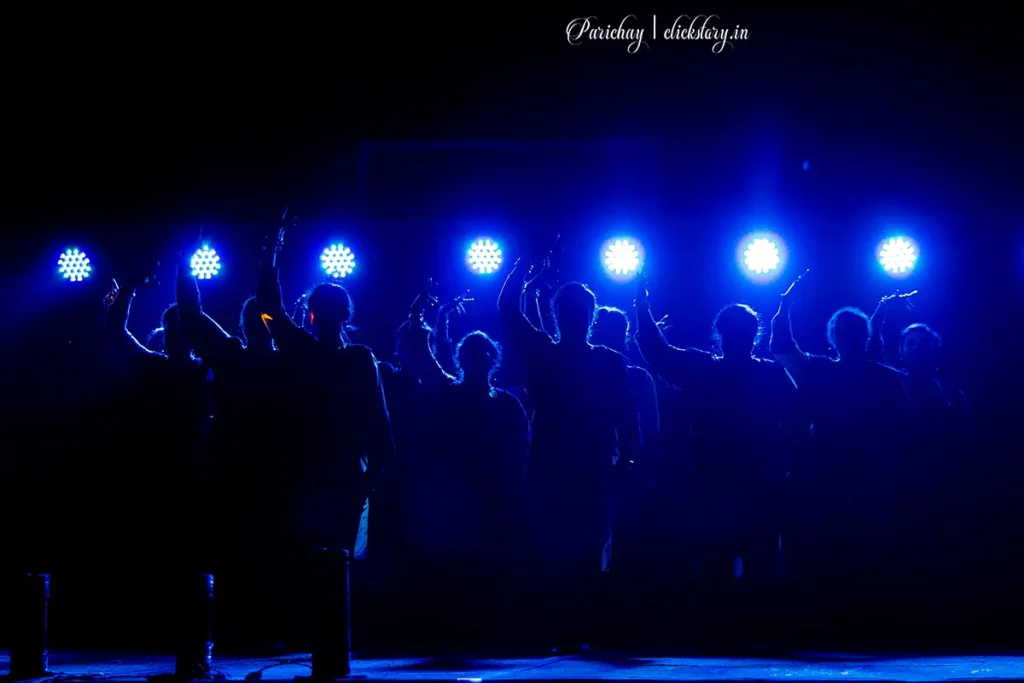
The good news is that you do not always need an expensive camera or complicated equipment to solve this problem. By understanding how your camera measures light and learning a few exposure techniques, you can capture much better photographs in challenging lighting conditions.
In this guide, we will explore how to expose for a dark subject against a bright background, with practical examples, camera settings, and techniques you can try immediately.
1. Why Does a Dark Subject Become Underexposed?
The main reason is the difference in brightness between your subject and the background.
Imagine photographing a person standing in front of a sunlit window. The window is extremely bright, while the person’s face receives much less light.
Your camera’s metering system measures the light in the scene and tries to determine an appropriate exposure. Depending on the metering mode and composition, the bright window may influence that measurement so strongly that the camera chooses an exposure that preserves the background but leaves the face too dark.
The reverse can also happen: if you expose for the person’s face, the window may become completely white.
This is a high-contrast scene, and it presents a challenge because the camera sensor has a limited dynamic range.
The key is to decide which part of the image matters most and choose an exposure strategy accordingly.
2. First Decide: Do You Want Detail or a Silhouette?
Before changing your camera settings, ask yourself one important question: should the subject appear bright enough to reveal its details, or should it remain dark against the bright background?
Both approaches can produce excellent photographs.
Example 1: A person standing against a sunset
Suppose you are photographing a person standing in front of a colorful sunset.
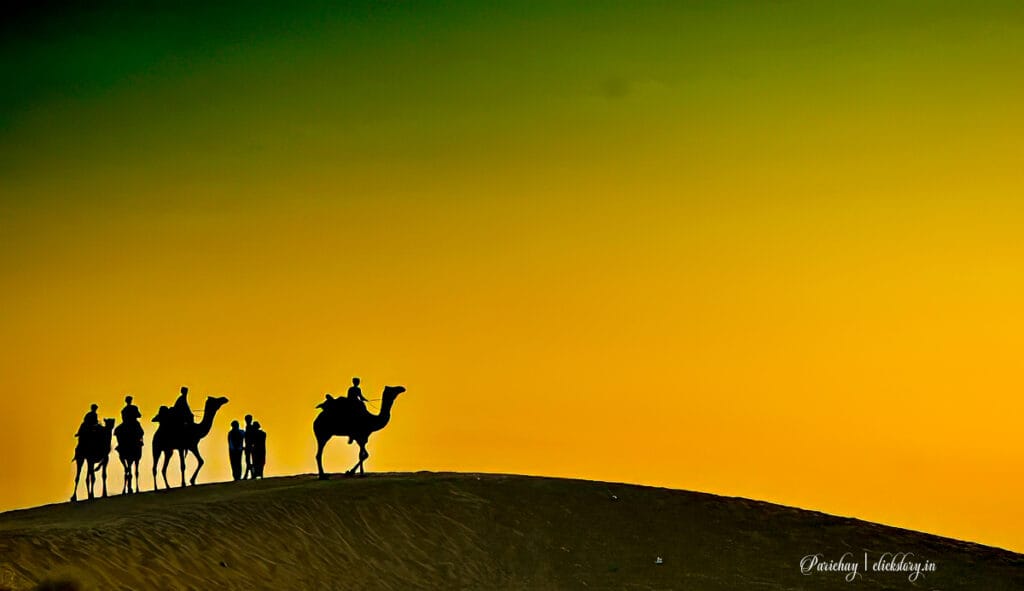
- If you want to see the person’s face, you need to expose for the person.
- If you want a dramatic black outline against the colorful sky, you should expose for the sunset.
These are two different creative goals, so they require different exposure decisions.
For a detailed subject: Increase exposure, use fill flash, or brighten the subject with a reflector.
For a silhouette: Meter the bright sky and allow the subject to remain dark.
Understanding this distinction will help you avoid making unnecessary adjustments.
3. Use Exposure Compensation to Brighten the Subject
One of the easiest solutions is exposure compensation. It is particularly useful when photographing in Aperture Priority or Shutter Priority mode.
Exposure compensation tells the camera to make the image brighter or darker than its metered recommendation.
It is usually marked with a +/- symbol.
How to use exposure compensation
- Set your camera to Aperture Priority (A or Av) or Shutter Priority (S or Tv).
- Compose your photograph with the dark subject against the bright background.
- Take a test photograph.
- If the subject is too dark, apply positive exposure compensation.
- Start with +1 EV and check the result.
- Try +1.3 EV or +2 EV if necessary, while watching for lost detail in the bright areas.
EV stands for exposure value. A change of +1 EV generally means twice as much exposure, while +2 EV means four times as much exposure.
The exact result depends on your camera’s metering and exposure controls.
Practical example: Photographing a person near a window
Suppose you are photographing a friend sitting beside a bright window.
| Setting | Initial attempt | Adjusted attempt |
|---|---|---|
| Shooting mode | Aperture Priority | Aperture Priority |
| Aperture | f/2.8 | f/2.8 |
| ISO | 100 | 100 |
| Exposure compensation | 0 EV | +1.3 EV |
| Result | Face too dark | Face brighter; window may lose some detail |
These settings are illustrative rather than universal. The ideal exposure depends on the available light, the window’s brightness, and the camera.
Important: Positive exposure compensation does not selectively brighten the subject. It brightens the overall exposure, so the background may become overexposed.
Use the histogram and highlight warnings to determine whether you are losing important background detail.
4. Change the Metering Mode
Your camera’s metering mode determines how it evaluates the brightness of the scene.
For difficult lighting, understanding metering modes can make a significant difference.
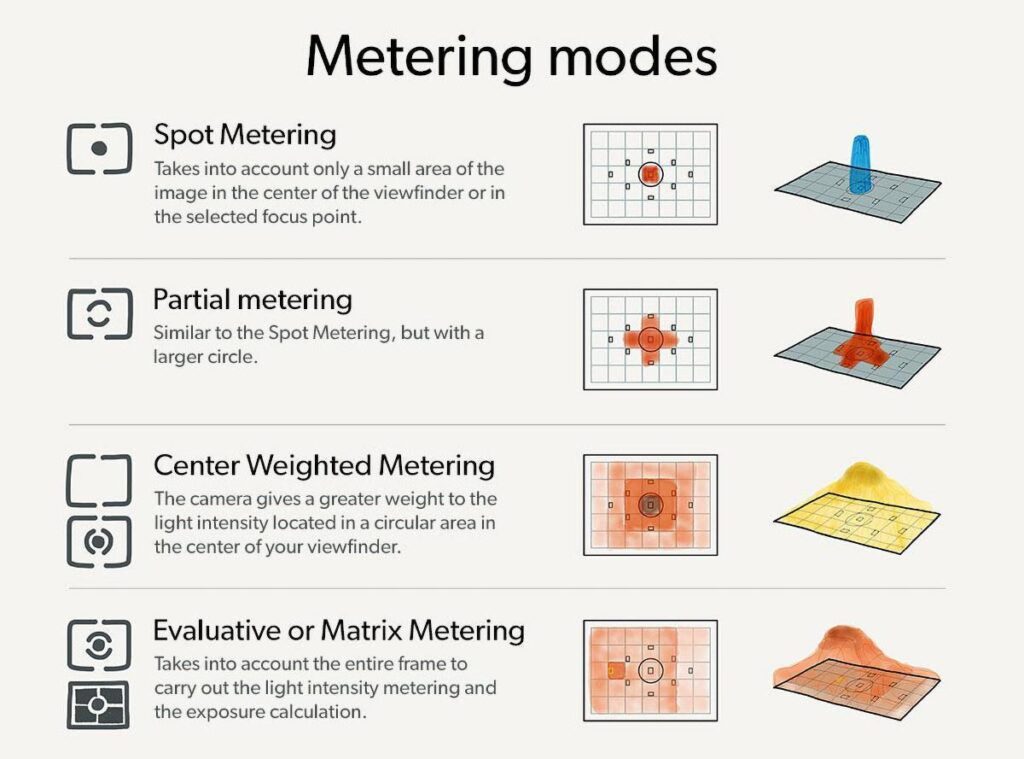
Evaluative or Matrix Metering
This mode considers brightness across much or all of the frame, often using scene-recognition information.
It works well in many everyday situations, but a very bright background can sometimes leave a darker subject underexposed.
Center-Weighted Metering
This mode gives greater importance to the center of the frame.
It can be useful when your subject is near the center, although the bright background may still affect the measurement.
Spot Metering
Spot metering measures light from a small area of the frame. Depending on the camera, that area may be linked to the active focus point or remain near the center.
If your main subject is a person’s face, you can place the spot over the face and take a meter reading.
The camera will recommend an exposure based on that small area, helping you prioritize the subject rather than the entire scene.
However, remember that the meter generally assumes the measured area should be rendered around a middle tone. A very dark subject may therefore require additional exposure compensation.
Practical example: A bird against a bright sky
Imagine photographing a dark bird sitting on a branch against a bright, cloudy sky.
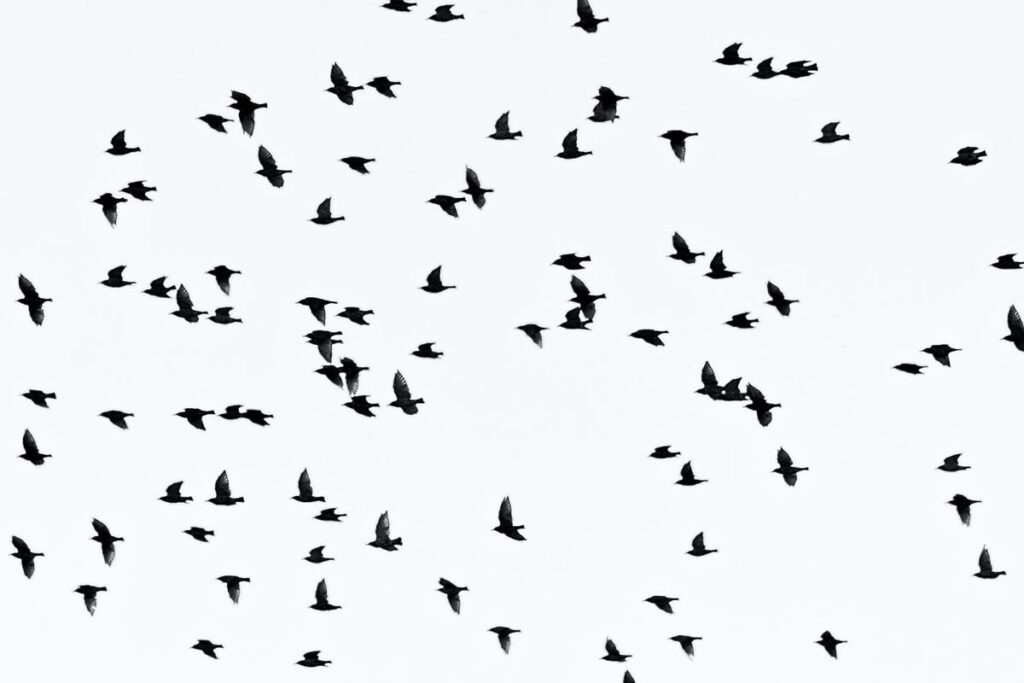
With evaluative metering, the camera may produce a dark bird because the sky occupies most of the frame.
Try the following approach:
- Switch to spot metering.
- Place the metering area on the bird’s body, if practical.
- Take a test shot.
- Inspect the bird’s feather detail and the sky.
- Adjust the exposure to balance subject detail against highlight preservation.

For a moving bird, you may find that manual exposure or exposure compensation in a semi-automatic mode is more practical than repeatedly spot-metering the subject.
5. Use Fill Flash to Brighten the Subject
Sometimes the best solution is not to change the camera’s exposure at all. Instead, add light to the subject.
This is where fill flash becomes useful.
Fill flash supplies additional light to a subject that is darker than its surroundings. It is particularly effective for portraits taken outdoors in bright sunlight or against a bright background.
Example: A portrait on a sunny day
Suppose you are photographing a person standing beneath a tree with a bright sky behind them. The background looks attractive, but shadows make the person’s face too dark.
You could increase exposure compensation, but this may cause the sky to lose detail.
Instead, use fill flash.
A practical starting point is:
- Shooting mode: Manual or Aperture Priority.
- ISO: 100–200 in bright daylight.
- Aperture: f/4 to f/5.6 for a single-person portrait, depending on the desired depth of field.
- Shutter speed: Within the camera’s normal flash-sync limit unless high-speed sync is available.
- Flash: TTL mode or manual power, adjusted to provide subtle fill.
These are starting points, not fixed rules. Expose for the background first, then add enough flash to reveal the subject’s facial details without making the lighting look unnatural. If the flash is too strong, reduce flash exposure compensation or lower the flash power.
Remember: Flash exposure compensation and regular exposure compensation are different controls. The first adjusts the flash contribution, while the second adjusts the camera’s overall exposure strategy.
6. Use a Reflector Instead of Flash
If you prefer natural-looking light, a reflector is another effective solution.
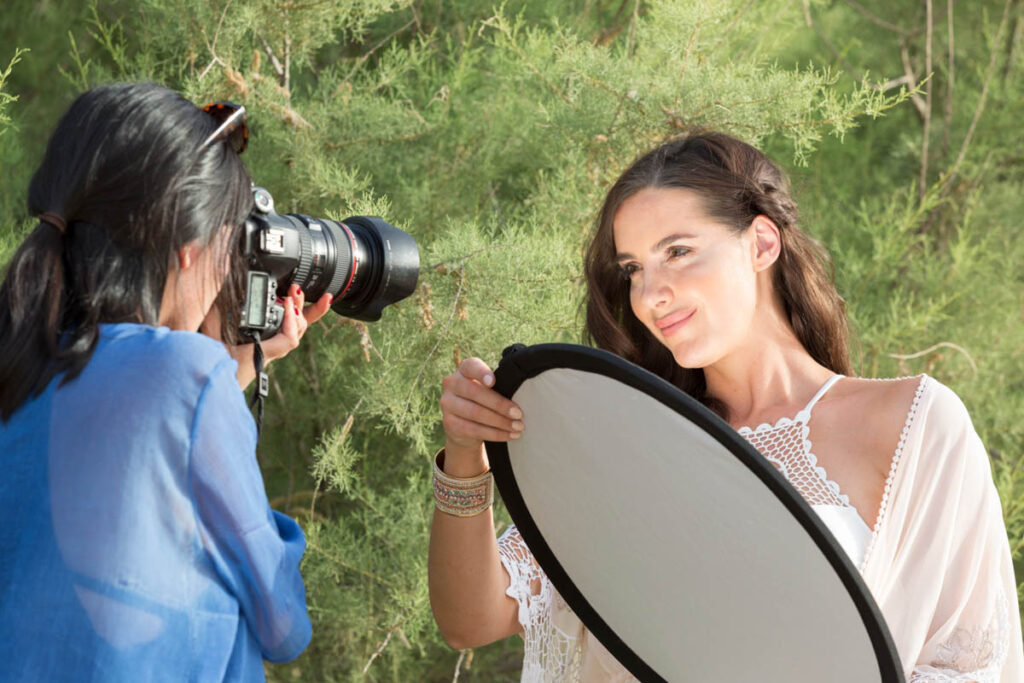
A reflector redirects existing light toward the subject. It does not create light, but it can brighten shadows without changing the exposure of the entire scene as much as increasing exposure would.
Example: A person standing outdoors
Imagine photographing a person with the sun behind them. The backlighting creates a beautiful rim of light around their hair, but their face is dark. Ask an assistant to hold a white or silver reflector in front of the person, outside the frame, and angle it toward their face.
The reflector bounces light from the surroundings onto the face, reducing the brightness difference between the subject and the background.
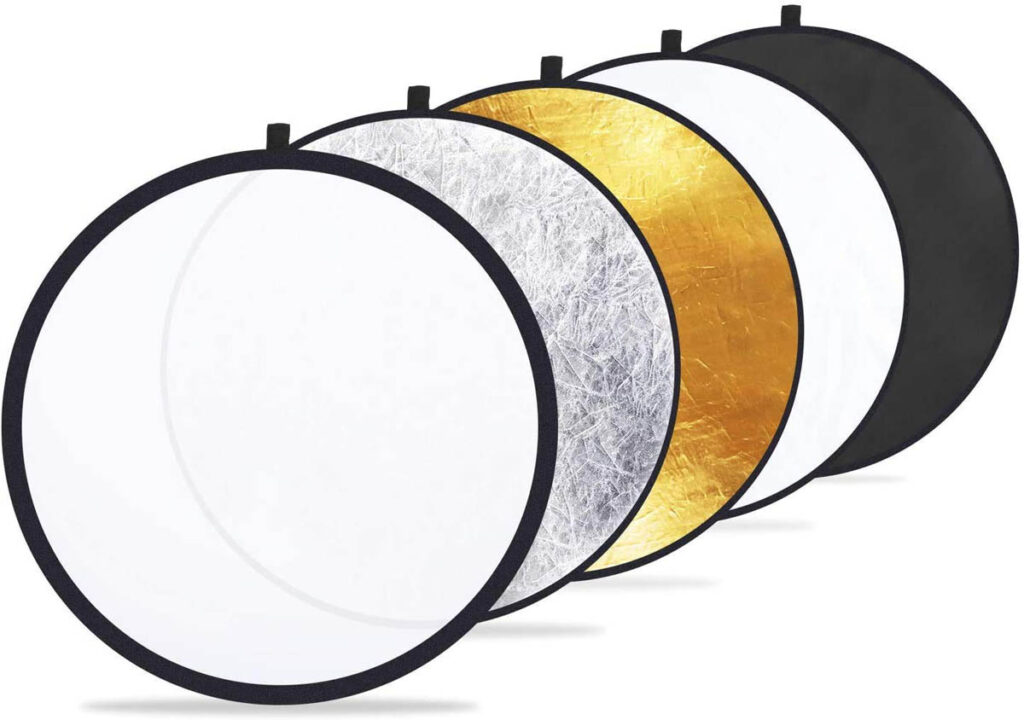
Different reflectors create different effects:
- White reflector: Soft, natural-looking fill.
- Silver reflector: Stronger reflected light, which can appear more contrasty.
- Gold reflector: Warmer reflected light.
- Translucent diffuser: Softens direct sunlight when placed between the sun and the subject.
For beginners, a white reflector is often the easiest option because it produces gentle fill without adding an obvious color cast.
7. Shoot in RAW to Preserve More Editing Flexibility
If you regularly photograph high-contrast scenes, shooting in RAW can give you greater flexibility during post-processing.
RAW files retain more of the sensor’s recorded tonal information than typical JPEG files, although the amount of recoverable detail depends on the camera, exposure, and lighting conditions.
You can often brighten a dark face or recover some bright background detail from a RAW file more effectively than from a heavily processed JPEG.
Example: Photographing someone against a bright window
Imagine that your photograph looks slightly dark overall, but the face still contains some recorded detail.
In a RAW editor such as Photoshop, Lightroom, Capture One, or another compatible application, you could:
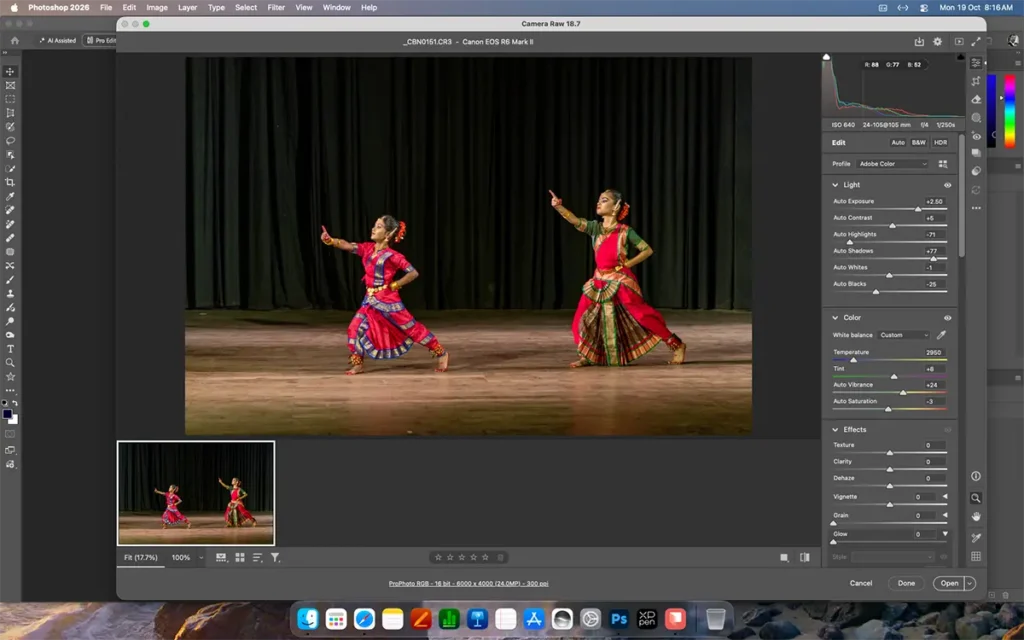
- Increase the overall exposure slightly if necessary.
- Raise the Shadows slider to reveal detail in the face.
- Reduce Highlights to recover detail in the window, if it was recorded.
- Use a subject mask to brighten the person without excessively brightening the background.
- Adjust white balance and contrast for a natural result.
Be careful not to raise the Shadows slider too aggressively. Doing so can introduce visible noise, especially in images captured at high ISO settings. Also, RAW is not magic. If a face is recorded almost completely black with very little signal, or a window is clipped beyond the sensor’s recording capacity, the missing detail may not be recoverable.
8. Learn to Read the Histogram
The histogram is one of the most useful tools for evaluating exposure.
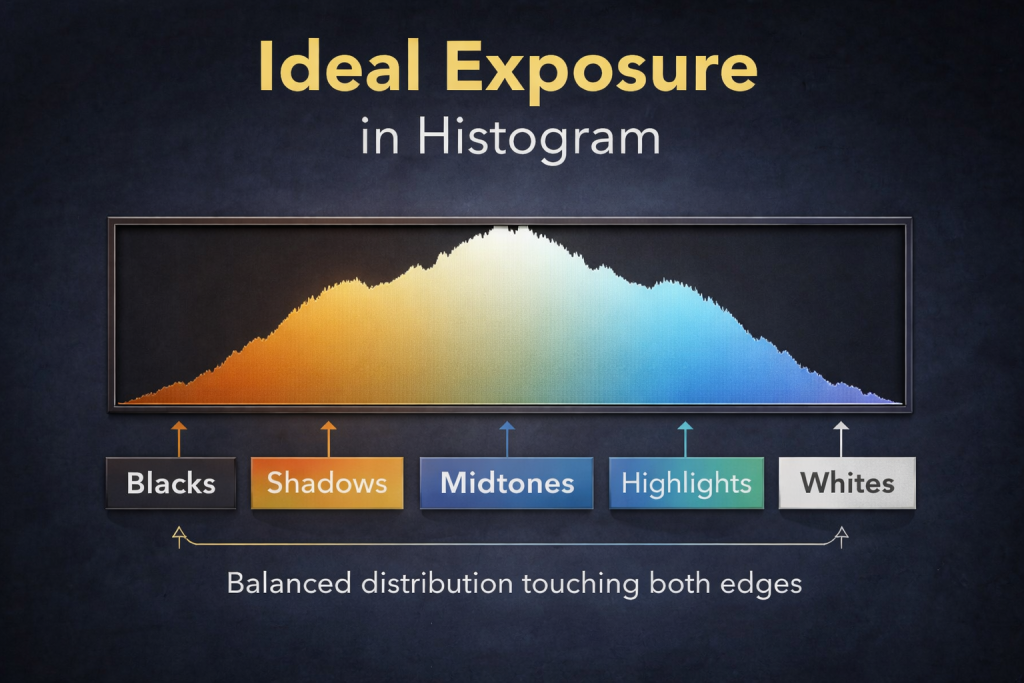
It displays the distribution of brightness values in your photograph, from dark tones on the left to bright tones on the right. For a dark subject against a bright background, you may see a histogram with a substantial amount of information at both ends. That pattern can indicate a high-contrast scene.
What should you look for?
- Heavy concentration on the left: The photograph contains many dark tones. This does not automatically mean it is underexposed.
- Heavy concentration on the right: The photograph contains many bright tones. This does not automatically mean it is overexposed.
- Clipping at the left edge: Some dark areas may have lost shadow detail.
- Clipping at the right edge: Some bright areas may have lost highlight detail.
A silhouette photograph may correctly have substantial dark information, while a snowy landscape may correctly have substantial bright information.
The goal is not to create a perfectly centered histogram. It is to preserve the tones that matter for your photograph.
When photographing a person against a bright sky, also check the face itself. A global histogram may not clearly tell you whether the subject’s facial detail is adequately exposed.
If your camera offers highlight warnings, review those as well.
9. Use Manual Exposure for Greater Control
When the light remains consistent, Manual mode gives you direct control over aperture, shutter speed, and ISO.
It is particularly helpful when the camera’s metering changes as you recompose the image.
For example, suppose you are photographing a person standing in front of a bright sky. As you move the camera slightly upward or downward, the amount of sky in the frame changes. Automatic metering may respond by changing the exposure.
With Manual mode, you can establish an exposure that works for the scene and keep it consistent while recomposing.
Example: Photographing a person against a bright sky
Start with these illustrative settings:
- Mode: Manual.
- ISO: 100.
- Aperture: f/5.6.
- Shutter speed: 1/500 second.
- White balance: Daylight or Auto.
Take a test photograph and inspect the subject and background.
If the person is too dark, you can slow the shutter speed, open the aperture, increase ISO, or add light with flash or a reflector.
However, each adjustment has consequences:
- Opening the aperture reduces depth of field.
- Slowing the shutter speed increases the risk of motion blur.
- Increasing ISO generally increases image noise.
- Adding light can brighten the subject while helping preserve the background exposure.
The example settings are not guaranteed to produce the correct exposure in every lighting condition. Use your camera’s meter and test photographs to establish the appropriate values.
If the background is extremely bright, you may need to accept some highlight loss, add fill light, or change your shooting position.
10. Understand the Limits of Dynamic Range
Sometimes, even careful exposure settings cannot preserve all the detail in a scene.
Consider a person standing inside a dim room while bright sunlight streams through a window. The difference in brightness between the room and the outside world may exceed what your camera sensor can record in a single exposure.
In this situation, you have several options.
Option 1: Add light to the subject. Use a flash, reflector, or continuous light to brighten the room or the person’s face.
Option 2: Change your position. A different angle may reduce the amount of bright sky or direct sunlight in the frame.
Option 3: Wait for softer light. Cloudy conditions, shade, or a different time of day may reduce the contrast.
Option 4: Bracket your exposures. Take multiple photographs at different exposures and combine them later using HDR techniques, provided the scene and subject allow it.
Option 5: Choose a silhouette. If you cannot preserve both the subject and the background, a deliberate silhouette may create a stronger photograph than a poorly balanced exposure.
The most effective approach depends on whether you prioritize realism, artistic mood, or maximum visible detail.
11. Common Mistakes to Avoid
Even experienced photographers can struggle with high-contrast lighting. Here are some mistakes worth avoiding.
Mistake 1: Increasing exposure without checking the background
Positive exposure compensation brightens the whole image. It may reveal facial details, but it can also turn a detailed sky into a featureless white area.
Solution: Check the highlights and consider fill flash or a reflector.
Mistake 2: Assuming spot metering always solves the problem
Spot metering measures a small area, but the meter’s recommended exposure may still need adjustment depending on the tone of the area being measured.
Solution: Meter the subject, take a test shot, and inspect the result.
Mistake 3: Trying to recover completely lost detail
If highlights or shadows are severely clipped, editing may not restore the missing information.
Solution: Adjust exposure while shooting, add light, or bracket exposures when appropriate.
Mistake 4: Using flash too aggressively
A powerful flash can make a portrait look unnatural, with a brightly lit face and a much darker background.
Solution: Use subtle fill, adjust flash power, and balance the flash with the ambient light.
Mistake 5: Ignoring the creative possibilities of silhouettes
Not every dark subject needs to be brightened. A silhouette can communicate shape, emotion, and atmosphere more effectively than a fully illuminated subject.
Solution: Decide on your creative intention before choosing the exposure.
12. A Simple Practice Exercise for Beginners
You can learn these techniques using a camera or even a smartphone with exposure controls.
Choose a subject, such as a person, a flowerpot, or a small object, and place it in front of a bright window.
Take the following photographs:
Photograph A: Automatic exposure
Use your camera’s automatic mode. Observe how the subject and background appear.
Photograph B: Positive exposure compensation
Switch to a semi-automatic mode and try +1 EV, then +2 EV. Compare the subject’s brightness and the background’s detail.
Photograph C: Spot metering
Measure the light from the subject and take another photograph. Check whether the subject’s details improve.
Photograph D: Add fill light
Use a reflector, a white card, or an appropriate fill light to illuminate the subject. Adjust the exposure to protect important background details.
Photograph E: Create a silhouette
Expose for the bright window and deliberately allow the subject to remain dark.
Compare all five images. Notice how changing the exposure strategy affects mood, subject detail, and background brightness.
This exercise teaches an important lesson: exposure is not simply about making everything bright. It is about controlling which parts of the image receive priority.
When photographing a dark subject against a bright background, the important question is: what should you meter, and what should you lock the exposure on? The answer depends on whether you want details in the subject or a silhouette.
13. What should you meter and lock?
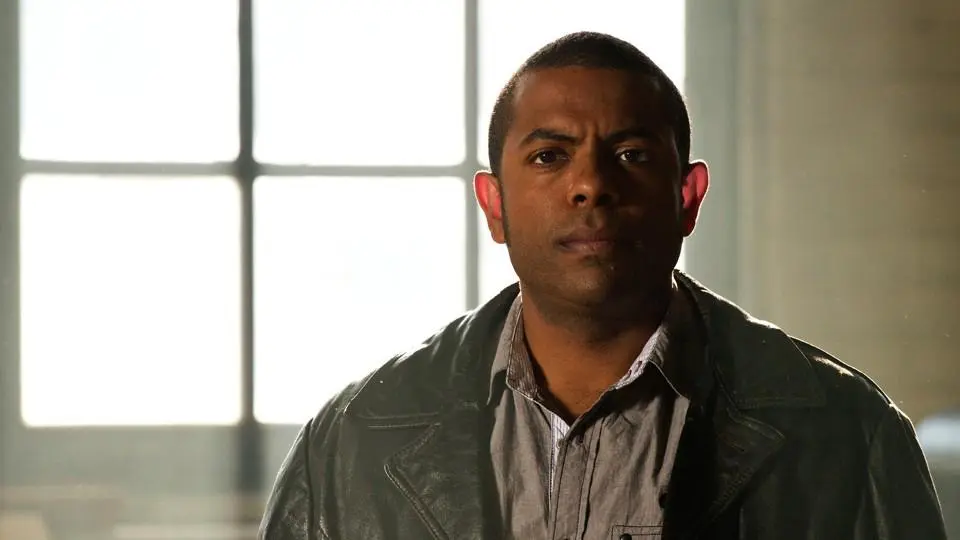
A. If you want the subject properly exposed
- Meter: The subject’s face, or the important area you want correctly exposed.
- Lock: The exposure based on that face reading, after any necessary compensation.
- Result: The face becomes brighter, but the background may lose highlight detail.
Best for portraits, people near windows, and backlit wildlife.
B. If you want a silhouette
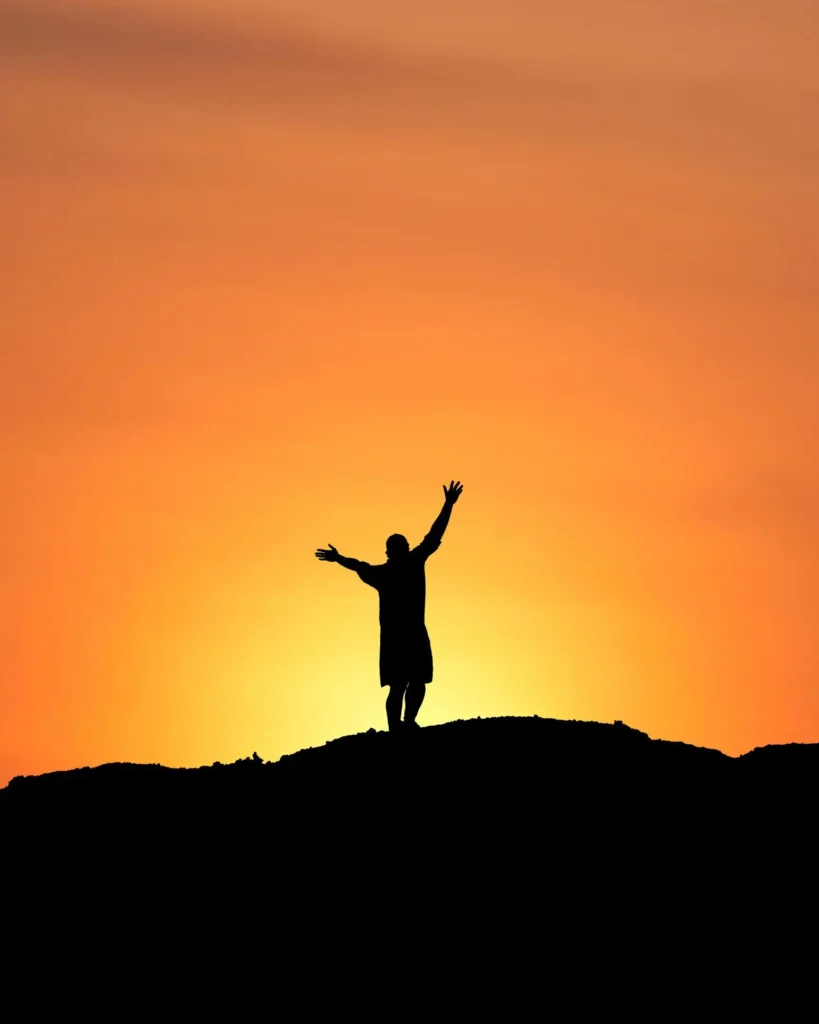
- Meter: The bright sky near the subject, avoiding the sun itself.
- Lock: The exposure based on the sky reading.
- Result: The sky retains its colors while the subject becomes dark.
Best for sunsets, creative portraits, and dramatic outlines.
C. If you want both subject and background detail

- Meter: The bright background first.
- Lock: The background exposure.
- Then: Add fill flash or reflected light to brighten the subject.
Best when the brightness difference is too great to handle through exposure adjustment alone.
14. How do you actually lock the exposure?
For example, suppose you are using a camera with an AE-L button (Auto Exposure Lock).
- Point the camera at the area you want to meter, such as the person’s face.
- Use spot or center-weighted metering, as appropriate.
- Half-press the shutter button or use the camera’s designated metering control to obtain a reading.
- Press AE-L if your camera uses that button to lock exposure.
- Recompose your photograph and take the shot.
The exact button sequence varies by camera. On some models, half-pressing the shutter does not lock exposure by default, and AE-L behavior may be configurable.
Important: Metering and locking are not the same thing. Metering measures light; locking preserves the selected exposure while you recompose. Neither automatically guarantees correct exposure, so review the result.
15. What if you are using a smartphone?
On many smartphones, tap the subject to set focus and exposure. Some models let you press and hold to activate AE/AF Lock. You can then adjust the exposure slider if the subject remains too dark.
For a silhouette, tap or meter the bright sky instead.
The simplest rule to remember:
- Want subject detail? Meter the subject.
- Want a silhouette? Meter the bright background.
- Want detail in both? Expose for the background and add light to the subject.
Deep black background while keeping your subject properly exposed
you need to make the ambient light on the background contribute as little as possible, while using flash to illuminate the subject.
The key is to understand that your camera settings control ambient exposure, while flash supplies additional light to the subject.
The technique: Underexpose the background, expose the subject with flash
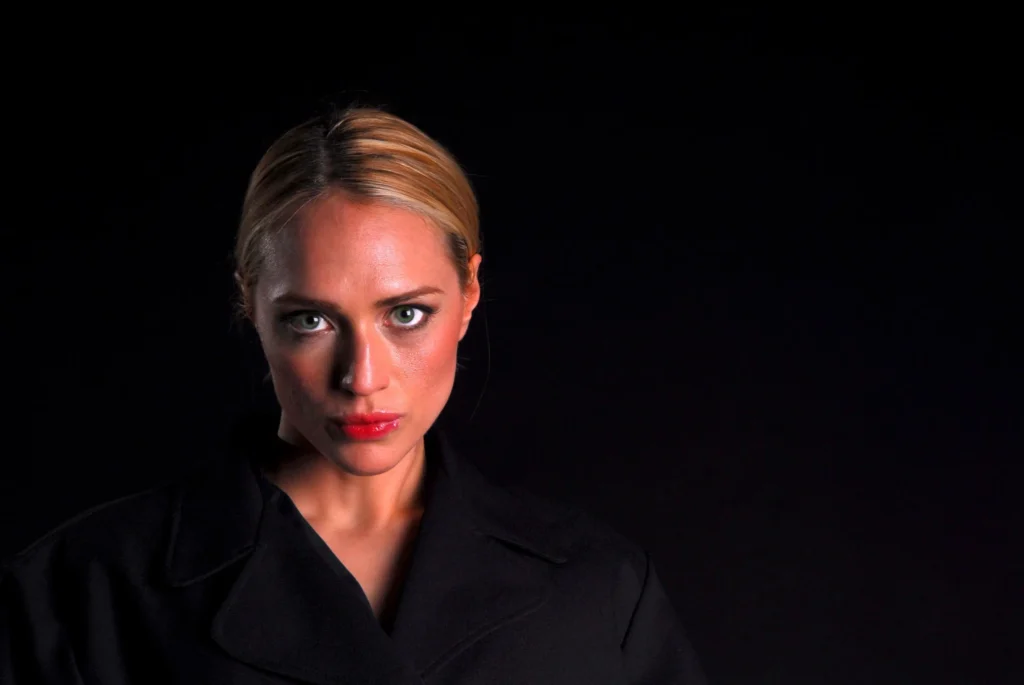
Follow these steps.
Step 1: Choose the right background.
Find a background that is already dark, shaded, or far behind your subject. A black wall, dark doorway, or deeply shaded area is ideal.
In bright sunlight, turning a sunlit green field or bright sky completely black can require very powerful flash and substantial underexposure. Choosing the right background makes the job much easier.
Step 2: Set your camera to Manual mode
Start with these example settings:
| Camera setting | Starting value |
|---|---|
| ISO | 100 |
| Aperture | f/8 |
| Shutter speed | 1/200 sec |
| Flash | Manual or TTL |
| White balance | Flash or Daylight |
These are starting values, not universal settings. Adjust them according to the actual light and your camera’s flash-sync limit.
Step 3: Turn off the flash temporarily
Take a photograph using your chosen camera settings.
Check the background:
- If it is still bright, reduce ambient exposure further.
- If it is nearly black, you are close to the desired result.
- If the subject is also dark, that is expected at this stage.
You can reduce ambient exposure by lowering ISO, selecting a smaller aperture number? No—use a larger f-number, such as f/11 or f/16, or a faster shutter speed within your flash-sync limits.
Step 4: Turn on the flash
Now illuminate your subject with flash. Start with TTL flash or a moderate manual flash power, then adjust until the subject is correctly exposed. The flash should light the subject without illuminating the background too much.
Step 5: Separate the subject from the background
This is especially important for a truly black background.
- Move the subject farther from the background.
- Keep the flash close enough to light the subject effectively.
- Aim the flash toward the subject rather than the background.
- Use a grid, snoot, or flag if available to control light spill.
Light falls off rapidly with distance. When the subject is much closer to the flash than the background, the subject can receive plenty of light while the background receives very little.
What if you are shooting in very bright sunlight?
Suppose you meter the sunlight and find that your correct exposure is around ISO 100, f/8, and 1/1000 sec.
Your ordinary flash may not synchronize at 1/1000 sec. You have several options:
- Use high-speed sync (HSS), if your camera and flash support it.
- Use a smaller aperture, such as f/16, and increase flash power as needed.
- Use a neutral-density (ND) filter, taking into account that it also reduces the flash light reaching the sensor.
- Move the subject into shade and use flash to light them.
HSS significantly reduces effective flash output, so it may be difficult to overpower direct sunlight unless your flash is sufficiently powerful or positioned close to the subject.
The secret to a truly black background
You do not necessarily need to underexpose the entire scene dramatically. You need the background to receive very little light compared with the subject.
A dark background, greater subject-to-background distance, controlled flash direction, and appropriate camera exposure are often more effective than simply increasing flash power.
One final point: if the background is directly illuminated by strong sunlight, your camera cannot magically make it black while leaving the subject bright without some combination of strong underexposure, controlled lighting, a different shooting angle, or post-processing.
My recommendation: Start with a subject in open shade, place a dark background several meters behind them, expose for a nearly black background, and use flash to light the subject. This is generally the easiest way to achieve the deep-black look.
Conclusion
Exposing a dark subject against a bright background becomes much easier once you understand the relationship between metering, exposure, and dynamic range.
Start by deciding whether you want visible subject detail or a silhouette. Then choose the appropriate technique: use positive exposure compensation to brighten the image, spot metering to prioritize the subject, fill flash or a reflector to add light, and RAW processing to improve tonal flexibility.
Always review your photographs and pay attention to both the subject and the background. If the brightness difference exceeds your camera’s dynamic range, consider changing the lighting, using multiple exposures, or embracing a silhouette.
With practice, you will learn to recognize these challenging lighting conditions and make deliberate exposure decisions instead of relying entirely on automatic settings.
The result will be photographs with better subject detail, more controlled highlights, and a stronger sense of visual intent.
