

The Invisible Speed Inside Your Camera
You probably already think about shutter speed when photographing movement.
A runner crossing the frame? Try 1/1000 sec.
A waterfall? Try 1/15 sec.
A portrait in low light? Perhaps 1/125 sec.
But there is another kind of speed inside your camera that you cannot directly set on most cameras: sensor readout speed.
Readout speed describes how quickly a camera’s image sensor can transfer the captured image data from the sensor to the camera’s processing system. It becomes especially important when you use an electronic shutter, record video, photograph fast-moving subjects, or shoot under artificial lighting.
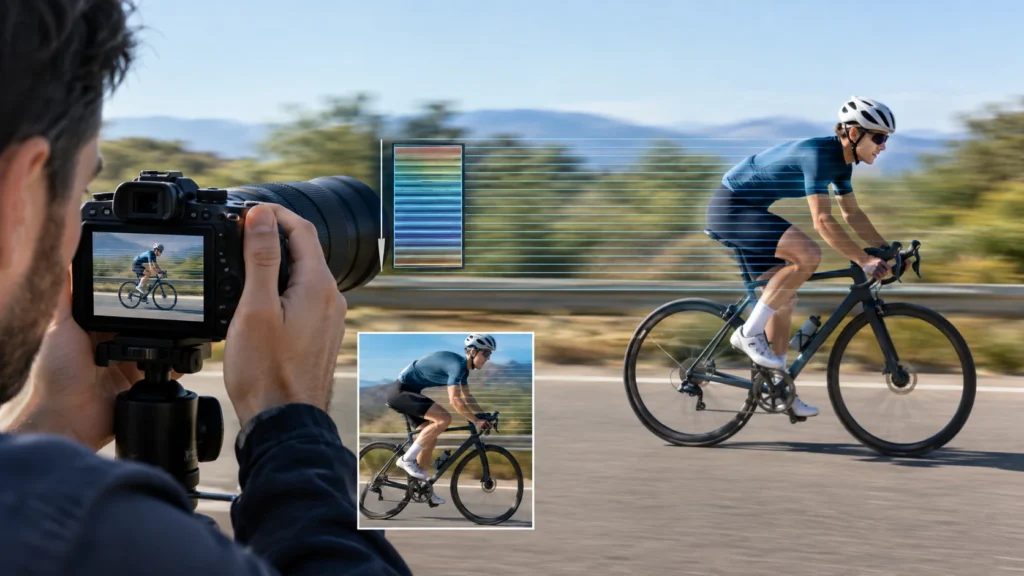
A camera can therefore have a very fast shutter speed such as 1/4000 sec and still produce distorted images of rapidly moving subjects if its sensor reads the image relatively slowly.
That is the key idea this tutorial will teach:
Shutter speed controls how long the camera exposes the image. Readout speed controls how quickly the sensor’s captured information is scanned and processed.
Once you understand that difference, several strange photographic problems suddenly make sense:
- Why a propeller sometimes looks bent.
- Why a fast-moving car can appear to lean.
- Why a golf club can look strangely shaped.
- Why electronic shutter can behave differently from mechanical shutter.
- Why some cameras are much better for action than their specifications initially suggest.
- Why video cameras can show “jello” or wobbling during camera movement.
- Why newer stacked-sensor cameras can be particularly good at fast action.
This lesson moves from the basic concept to practical shooting, troubleshooting, creative use, and a hands-on assignment.
Suggested visual:
“Same moving bicycle photographed with a mechanical shutter and a slow-readout electronic shutter, showing the difference in subject shape.”
1. What Is Camera Readout Speed?
Camera readout speed is the amount of time the image sensor needs to read and transfer the captured image data.
Think of the sensor as a large grid of millions of pixels.
When you take a photograph, the pixels collect light. The camera then needs to retrieve the information from those pixels and turn it into an image.
The important point is that, in most modern CMOS sensors, the camera does not read every pixel simultaneously.
Instead, the sensor typically reads the image line by line, from one part of the sensor to another.
This is called a rolling shutter readout.
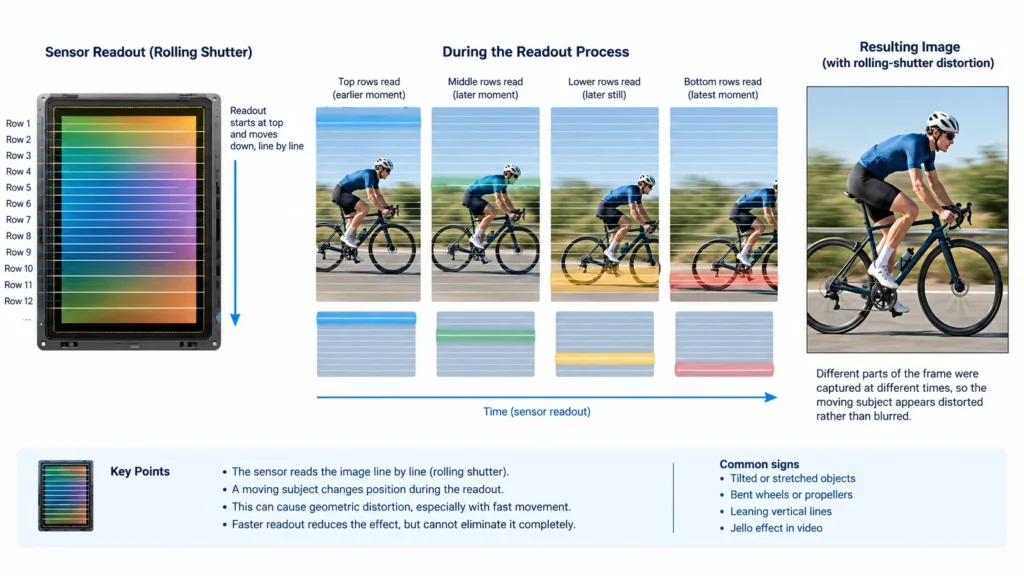
Imagine photographing a person running from left to right.
The top of the sensor might be read first. By the time the camera reads the bottom of the sensor, the person has moved.
The camera therefore records different parts of the subject at slightly different moments.
That small time difference can produce distortion.
A simple analogy
Imagine scanning a document with a scanner while someone is moving the document sideways.
The scanner isn’t capturing the whole page at exactly the same instant. It is scanning one line after another.
If the document moves during the scan, its shape becomes distorted.
A camera sensor using rolling-shutter readout behaves in a similar way.
Readout speed versus shutter speed
These terms sound similar but describe different things.
| Feature | Shutter speed | Sensor readout speed |
|---|---|---|
| What it controls | Exposure duration | How quickly sensor data is read |
| Example | 1/1000 sec | Sensor may take several milliseconds to read |
| Main effect | Motion blur/exposure | Rolling-shutter distortion |
| Usually user-controlled? | Yes | Usually no |
| Particularly important for | Motion blur | Electronic shutter, action, video |
This distinction is fundamental.
You could photograph a race car at 1/4000 sec and still get rolling-shutter distortion if the sensor takes relatively long to scan the frame.
Conversely, a camera with extremely fast readout can produce much cleaner-looking electronic-shutter images of rapid movement.
What does “fast readout” actually mean?
A faster sensor might read the entire frame in, for example, a few milliseconds, while a slower sensor could take considerably longer.
Manufacturers do not always publish a simple “full sensor readout time” figure, and the exact behavior can vary by:
- resolution
- sensor mode
- crop mode
- bit depth
- image format
- electronic shutter mode
- video resolution
- frame rate
- processing requirements
So don’t assume that a camera with a higher megapixel count automatically has slower readout—or faster readout.
Sensor architecture matters.
2. Why Is Readout Speed Important?
Readout speed matters most when something changes position while the sensor is being read.
That includes:
- fast-moving subjects
- panning
- handheld camera movement
- rotating objects
- propellers
- flickering artificial lights
- video recording
- electronic shutter photography
It is much less important for a stationary landscape photographed from a tripod.
The creative consequence
Slow readout can turn a perfectly sharp photograph into a photograph with geometric distortion.
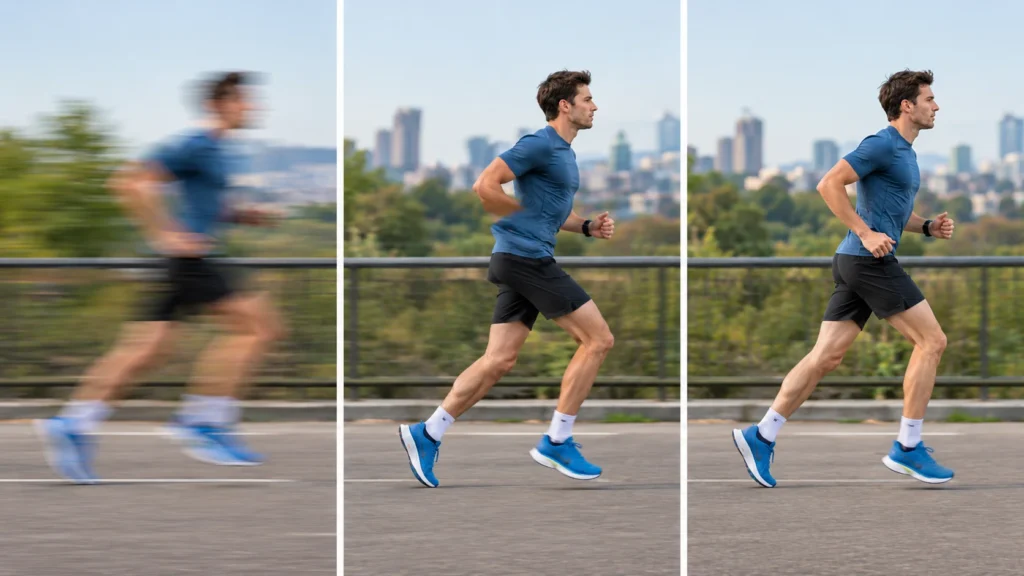
Notice that this is different from ordinary motion blur.
Motion blur looks like a subject has been smeared during the exposure.
Rolling-shutter distortion looks like the subject has been stretched, compressed, tilted, or bent because different parts were recorded at different times.
Suggested visual:
“Comparison of motion blur versus rolling-shutter distortion: one image showing a blurred runner and another showing a runner with geometrically distorted body proportions.”
3. The Core Principles
Principle 1: The sensor does not necessarily capture the whole frame at once
With a typical rolling-shutter sensor, different horizontal rows are read at different times.
Suppose:
- The top of the frame is read.
- The subject moves.
- The middle is read.
- The subject moves again.
- The bottom is read.
The final photograph combines information captured at slightly different moments.
What you see
A vertical object can become diagonal.
A rotating object can appear bent.
A moving subject can appear stretched.
Practical example
Photograph a rotating ceiling fan using an electronic shutter.
At a sufficiently fast readout, the blades may retain a recognizable shape.
With slower readout, individual blades can appear dramatically curved or displaced.
Suggested visual:
“Ceiling fan photographed using electronic shutter with different sensor readout speeds.”
Principle 2: Faster shutter speed does not automatically solve rolling shutter
This is one of the most important lessons.
Suppose you photograph a racing motorcycle at:
1/250 sec
and then:
1/4000 sec
The second image will have much less traditional motion blur.
But the sensor may still take roughly the same amount of time to scan the frame in electronic-shutter mode.
So the motorcycle can remain geometrically distorted.
Remember:
Shutter speed = exposure time.
Readout speed = sensor scanning time.
They interact with movement, but they are not the same thing.
Principle 3: Rolling shutter becomes more visible as relative movement increases
The more the subject or camera moves during the sensor’s readout, the more obvious the distortion can become.
This means readout problems are influenced by:
- subject speed
- camera movement
- subject distance
- focal length
- direction of movement
- sensor readout time
A subject moving rapidly across the frame is usually more problematic than one moving directly toward or away from the camera.
Example
A cyclist traveling directly toward you may produce relatively little sideways distortion.
The same cyclist racing horizontally across the frame can produce much more obvious distortion.
Principle 4: Camera movement can create rolling-shutter distortion too
You do not need a fast-moving subject.
Imagine recording video while quickly panning from left to right.
The scene may appear to bend or wobble.
This is commonly called the jello effect.
The environment itself isn’t bending. The camera is moving while different portions of the sensor are being read at different moments.
Suggested visual:
“Straight architectural lines photographed while rapidly panning with a rolling-shutter sensor, showing curved or leaning structures.”
Principle 5: Electronic shutter makes readout particularly important
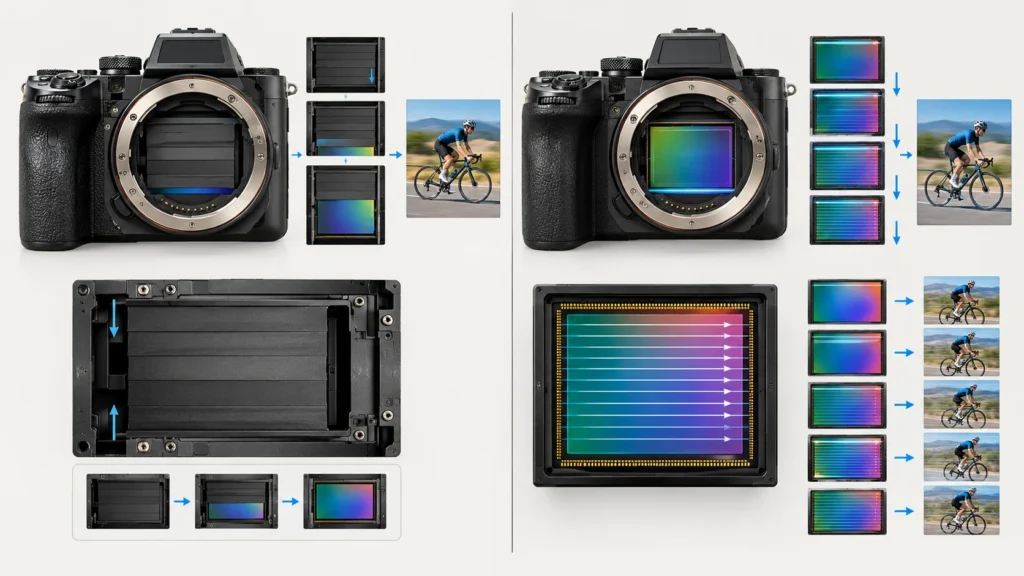
A mechanical shutter physically opens and closes to expose the sensor.
An electronic shutter tells the sensor electronically when to begin and end exposure.
Electronic shutters offer important advantages:
- silent operation
- very high shutter speeds
- reduced mechanical wear
- less mechanical vibration
- useful for discreet photography
- useful for some high-frame-rate shooting
But with a conventional rolling-shutter sensor, the sensor still needs time to read the image.
That’s where readout speed becomes critical.
A fast electronic shutter is therefore not automatically equivalent to a fast sensor.
4. Mechanical Shutter, Electronic Shutter and Readout
Understanding these three concepts together makes the subject much easier.
Mechanical shutter
The shutter physically controls exposure.
For fast action, mechanical shutter can sometimes avoid the visible rolling-shutter distortion associated with an electronic shutter because the mechanical shutter effectively exposes the frame through a moving physical shutter curtain.
However, mechanical shutters have their own limitations, including:
- mechanical wear
- noise
- vibration
- maximum shutter speeds
- limitations at very high frame rates
Electronic shutter
The sensor electronically controls exposure.
Its biggest advantage is silence.
Its major limitation on many cameras is rolling-shutter distortion.
Global shutter
A global shutter captures all pixels at essentially the same instant rather than progressively scanning the frame.
This can largely eliminate the classic rolling-shutter distortion caused by sequential sensor readout.
Global-shutter sensors are therefore particularly attractive for:
- high-speed action
- video
- scientific imaging
- industrial imaging
- situations involving rapid camera movement
But global shutter and rolling shutter are sensor architectures, not simply menu settings you can switch between on every camera.
5. Camera Settings and Technical Considerations
Readout speed itself is usually not something you can adjust directly.
Instead, you control how you work around it.
Shutter speed
Shutter speed is highly relevant because it controls motion blur, even though it does not normally change the sensor’s physical readout speed.
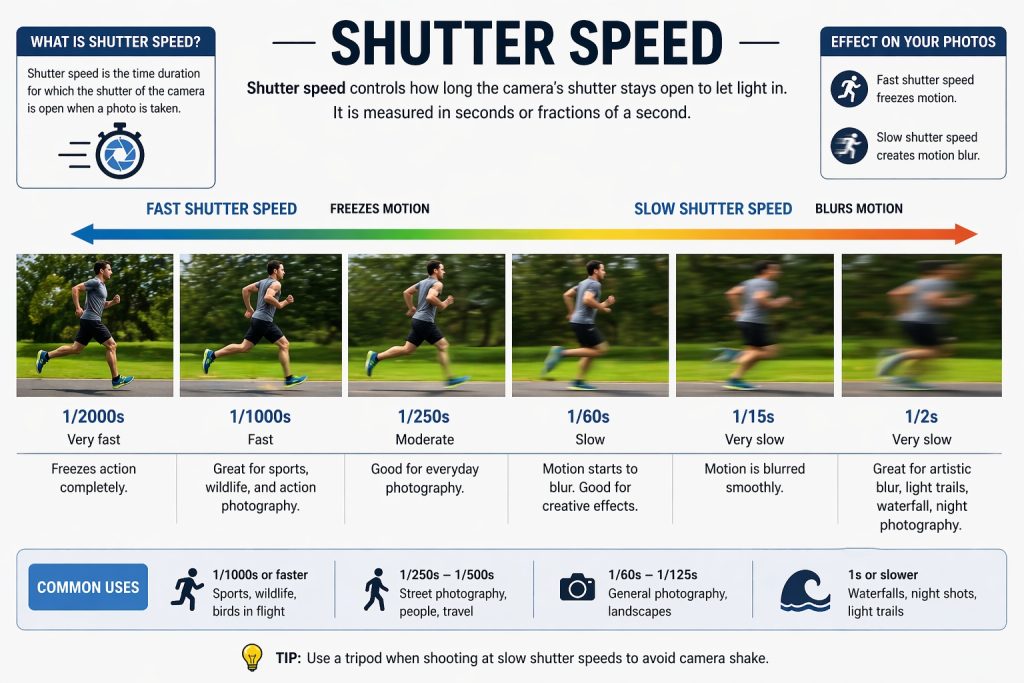
For example:
1/30 sec
- Significant motion blur
- Moving subjects may streak
- Rolling-shutter distortion may be less visually obvious because ordinary blur dominates
1/500 sec
- Good starting point for moderate action
- Considerably less motion blur
- Electronic-shutter distortion can become easier to notice
1/2000 sec
- Very little motion blur
- Useful for fast action
- Rolling shutter can still be obvious with a slow sensor
So don’t respond to rolling shutter simply by increasing shutter speed.
First determine whether the problem is blur or geometric distortion.
Aperture
Aperture does not directly change sensor readout speed.
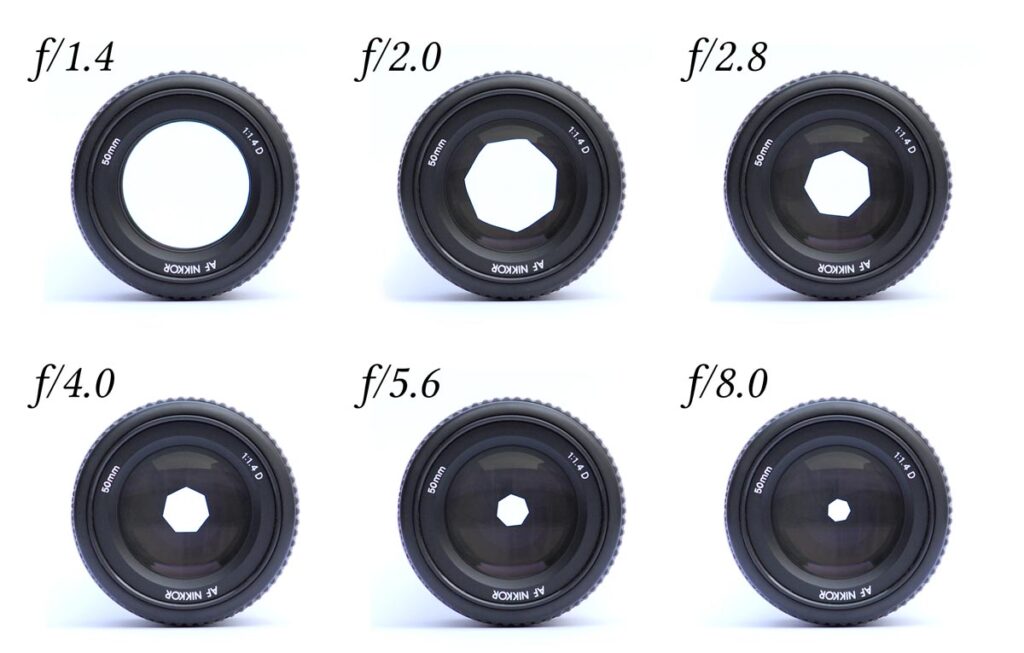
However, it controls how much light reaches the sensor.
For action, you might choose:
f/2.8, 1/1000 sec, ISO 400
because you want a fast shutter while maintaining a reasonable ISO.
If light is plentiful, you might use:
f/4, 1/2000 sec, ISO 400
The aperture decision is therefore about exposure and depth of field—not readout itself.
ISO
ISO also does not make the sensor physically read faster.
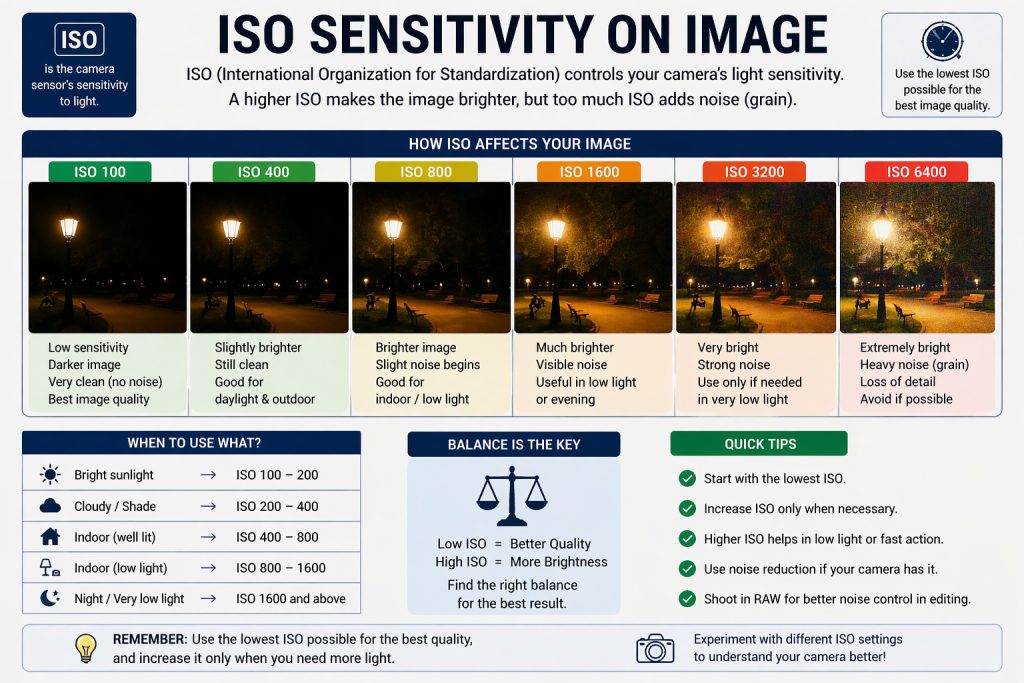
But it can allow you to maintain a sufficiently fast shutter speed when light is limited.
For example:
1/1000 sec, f/2.8, ISO 1600
may freeze a dancer indoors better than:
1/250 sec, f/2.8, ISO 400
because the slower shutter would introduce more motion blur.
However, raising ISO does not solve rolling shutter.
Focal length
Focal length has an indirect but important effect.
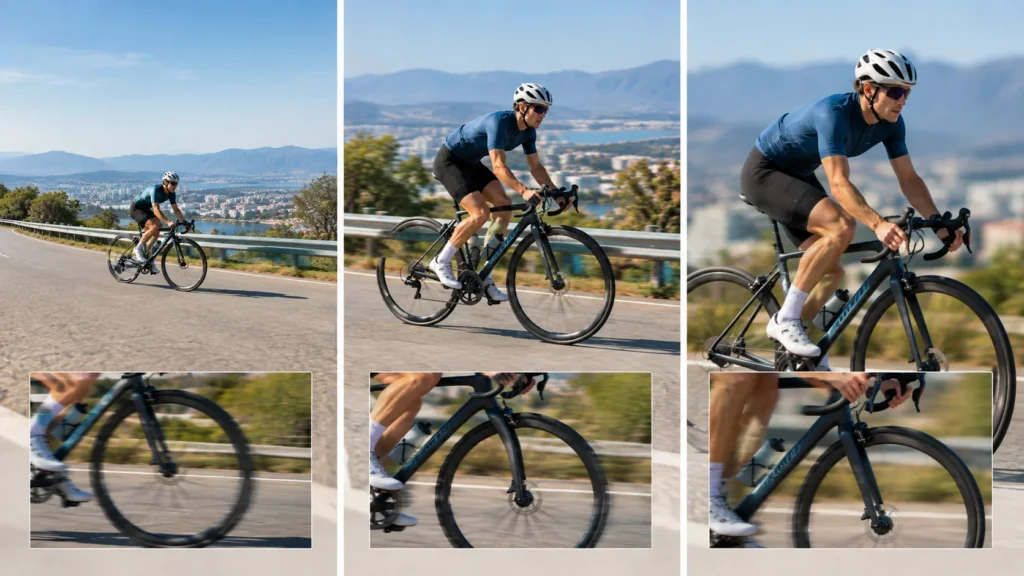
A long lens magnifies movement.
A small camera movement that looks insignificant at 24mm can become much more noticeable at 400mm.
For example:
- 24mm: broad view, camera movement appears relatively small
- 85mm: movement becomes more noticeable
- 400mm: tiny camera movements can become very obvious
This is one reason fast readout is particularly useful when using long lenses for action and video.
Focus mode
Focus mode does not change sensor readout speed, but it matters greatly for the type of photography where readout speed becomes important.
For moving subjects, use continuous autofocus such as:
- AF-C on many cameras
- Servo AF on some systems
Pair that with appropriate subject detection or tracking when available.
The goal is to keep the subject sharp while you evaluate whether electronic shutter is producing acceptable geometry.
Shooting mode
For action:
- Shutter Priority can make it easy to maintain a minimum shutter speed.
- Manual exposure + Auto ISO gives you greater control over shutter and aperture.
- Continuous high-speed burst may increase the importance of sensor and processor performance.
Do not assume that a camera’s advertised maximum frame rate tells you everything about its action performance.
A camera might achieve an impressive burst rate but still have significant rolling-shutter distortion.
White balance and metering
White balance and metering do not directly affect readout speed.
However, artificial lighting introduces another important consideration.
Some LED, fluorescent, and other artificial light sources can flicker rapidly.
When combined with electronic shutter, this can produce:
- uneven brightness
- horizontal bands
- different exposure across the frame
- color variations
If this happens, try:
- mechanical shutter
- electronic front-curtain shutter
- anti-flicker functions
- appropriate shutter speeds
- high-frequency flicker reduction if your camera provides it
The exact options depend on the camera.
6. A Practical Shooting Workflow
Here’s how to approach a situation where readout speed may matter.
Step 1: Identify movement
Ask:
Is the subject moving quickly across the frame?
If yes, rolling shutter could become relevant.
If the subject is completely stationary, it probably isn’t a major concern.
Step 2: Decide whether you need electronic shutter
Ask why you’re considering electronic shutter.
Perhaps you need:
- silence
- extremely fast shutter speed
- vibration-free operation
- high burst rates
- discreet shooting
If none of these are important, mechanical shutter may be the simpler choice for difficult action.
Step 3: Choose your shutter speed
Start according to the movement.
For example:
- Walking: around 1/250 sec
- Running: around 1/500–1/1000 sec
- Fast sports: around 1/1000–1/2000 sec
- Very rapid movement: 1/2000 sec or faster
These are starting points, not universal rules.
Step 4: Choose your aperture
Select an aperture based on the depth of field you need and the available light.
For example:
f/2.8
gives you more light and can help separate a subject from its background.
f/5.6
provides more depth of field and can make focusing more forgiving.
Step 5: Set ISO
Raise ISO only as necessary to maintain your desired exposure.
For example:
Aperture: f/2.8
Shutter: 1/1000 sec
ISO: 400
might work outdoors.
Indoors, the same exposure may require:
f/2.8
1/1000 sec
ISO 1600
Step 6: Test electronic shutter
Photograph the moving subject using electronic shutter.
Don’t inspect only whether the image is sharp.
Zoom in and look for:
- tilted vertical lines
- stretched bodies
- bent objects
- distorted wheels
- strangely shaped sports equipment
- uneven exposure
Step 7: Compare with mechanical shutter
Repeat the sequence using mechanical shutter.
Keep your composition and exposure as similar as possible.
If the mechanical-shutter images have more natural geometry, you’ve found a practical reason to use mechanical shutter for that situation.
Step 8: Change your shooting angle
If distortion is severe, change the relationship between subject movement and the frame.
Instead of photographing a runner crossing directly from left to right, try positioning yourself so the runner moves more toward or away from the camera.
This can dramatically reduce the apparent distortion.
7. Five Practical Shooting Situations
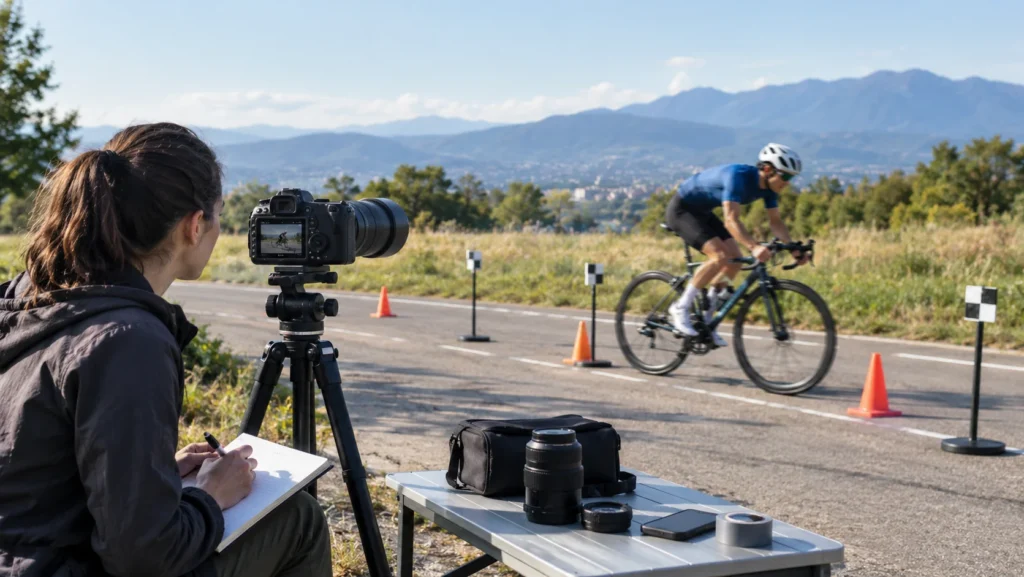
Example 1: Photographing a racing cyclist
Situation: A cyclist passes quickly from left to right.
Subject: Road cyclist moving at high speed.
Lighting: Bright afternoon sunlight.
Composition: Place the cyclist slightly off-center with space in front.
Suggested settings:
- Aperture: f/4
- Shutter speed: 1/1000 sec
- ISO: 200
- Focal length: 200mm
- Focus: Continuous AF
- Drive: High-speed continuous
What to look for
Use electronic shutter for a test burst, then inspect the wheels, frame, and rider.
If the wheels or bicycle frame appear unnaturally tilted, try mechanical shutter.
Expected result
You want a sharp cyclist with natural geometry and enough space ahead of the rider.
Creative variation
Try panning with the cyclist at 1/30–1/60 sec.
Now you’re deliberately introducing motion blur to communicate speed. Readout behavior becomes part of the experiment rather than simply a problem.
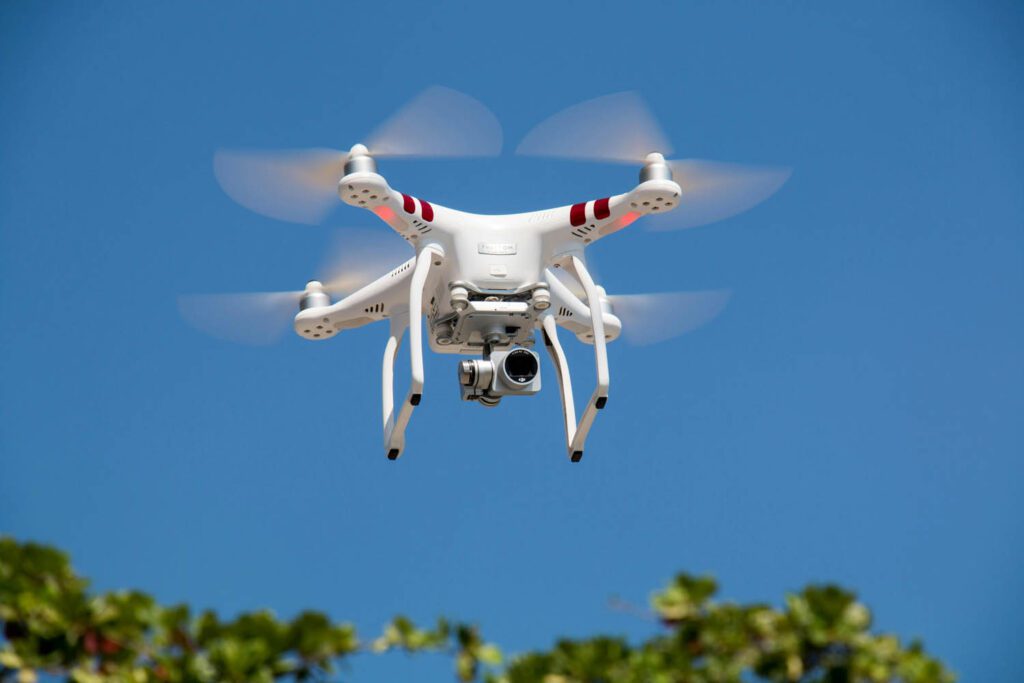
Example 2: Photographing a spinning propeller
Situation: Photograph a drone or aircraft with a rotating propeller.
Lighting: Bright daylight.
Composition: Keep the aircraft against a clean sky.
Suggested settings:
- Aperture: f/5.6
- Shutter: 1/2000 sec for a freeze-frame test
- ISO: 200
- Focal length: 200mm
- Electronic shutter: test first, then compare mechanically
What to look for
Examine the propeller.
A very fast shutter can freeze individual blades, while a slower shutter can produce a more natural circular blur.
Electronic shutter may create unusual blade shapes because the propeller changes position during sensor readout.
Creative variation
Intentionally reduce shutter speed to around 1/125 sec to produce a more recognizable propeller blur.
Example 3: Indoor sports
Situation: Basketball player moving rapidly beneath LED lighting.
Lighting: Artificial indoor lighting.

Suggested settings:
- Aperture: f/2.8
- Shutter: 1/1000 sec
- ISO: 1600–3200
- Focal length: 70–200mm
- Focus: Continuous AF
- Shutter: Compare mechanical and electronic modes
What to look for
Look for two separate problems:
- Rolling-shutter distortion.
- LED flicker or banding.
If electronic shutter creates uneven exposure across the frame, switch shutter modes or use an appropriate anti-flicker setting.
Creative variation
Try a slower shutter such as 1/125 sec while panning with the player to create intentional background movement.
Example 4: Video while walking
Situation: Handheld video while moving through a city.
Lighting: Daylight.
Lens: 24mm or 35mm.
Suggested starting settings:
- Shutter: approximately 1/50 sec for 25 fps video
- Aperture: around f/4
- ISO: Auto or manually selected according to light
- Stabilization: appropriate camera/lens mode
What to look for
Rapidly pan across buildings.
If vertical lines appear to lean or the scene appears to wobble, the sensor’s rolling shutter is becoming visible.
Creative variation
Repeat the movement with slower, smoother camera motion.
The goal is not merely to buy a camera with faster readout; good camera technique can reduce how noticeable rolling shutter becomes.
Example 5: Photographing a golf swing
Situation: Golfer swinging a club at high speed.
Lighting: Outdoor daylight.
Suggested settings:
- Aperture: f/4
- Shutter: 1/2000 sec
- ISO: 400
- Focal length: 200mm
- Focus: Continuous AF
- Burst: High speed
What to look for
The club is an excellent diagnostic subject.
Because it moves rapidly, rolling shutter can make it appear dramatically curved or displaced.
Compare electronic and mechanical shutter frames.
Creative variation
Instead of trying to eliminate distortion, deliberately photograph the swing electronically and use the unusual shape as a visual representation of motion.
8. Common Mistakes

Mistake 1: Assuming 1/4000 sec eliminates all movement problems
What goes wrong: The subject is sharp but geometrically distorted.
Why: Fast shutter speed reduced motion blur but did not necessarily speed up sensor readout.
How to recognize it: Look for tilted or stretched shapes.
Fix: Try mechanical shutter, change shooting angle, or use a camera with faster readout.
Mistake 2: Confusing motion blur with rolling shutter
What goes wrong: You keep changing shutter speed without solving the problem.
Why: The visual symptoms are being misdiagnosed.
Fix: Blur means the subject moved during exposure. Distortion means different parts of the frame were recorded at different times.
Mistake 3: Assuming electronic shutter is always better
What goes wrong: You use electronic shutter for every situation and encounter distortion or flicker.
Why: Silent and fast does not mean universally superior.
Fix: Treat electronic and mechanical shutters as different tools.
Mistake 4: Testing only stationary subjects
What goes wrong: Your electronic-shutter test looks perfect.
Why: A stationary subject doesn’t reveal rolling-shutter problems.
Fix: Test using a moving subject, rotating object, or controlled camera pan.
Mistake 5: Ignoring artificial lighting
What goes wrong: Dark bands or strange color variations appear.
Why: Some artificial lights fluctuate rapidly.
Fix: Try mechanical shutter or your camera’s flicker-reduction/high-frequency flicker functions.
Mistake 6: Panning too aggressively
What goes wrong: Buildings and vertical objects appear bent.
Why: The camera moves significantly during sensor readout.
Fix: Pan smoothly, reduce unnecessary camera movement, use a wider focal length, or use a camera with faster readout.
Mistake 7: Evaluating only sharpness
What goes wrong: You conclude that an image is successful because the subject is sharp.
Why: Autofocus and shutter speed are not the only considerations.
Fix: Check sharpness and geometry, especially around fast-moving subjects.
Mistake 8: Assuming all electronic-shutter cameras behave similarly
What goes wrong: You expect the same results from different cameras.
Why: Sensor architecture and readout speeds vary considerably.
Fix: Test the specific camera you own or are considering.
9. Creative Ways to Use Readout and Motion
Readout speed is usually discussed as a limitation, but photographers can also use motion and timing creatively.
1. Deliberate rolling-shutter distortion
Photograph a rapidly rotating object electronically.
The distorted shape can become part of the photograph’s visual language.
Try:
- spinning wheels
- propellers
- dancers
- rotating signs
- moving vehicles
The objective is no longer perfect geometry.
2. Combine slow shutter with intentional movement
Try:
1/15 sec + panning
instead of simply freezing the subject.
The background becomes streaked while the subject retains some recognizable structure.
This can communicate speed much more effectively than a perfectly frozen frame.
3. Change the direction of movement
Compare:
Subject moving horizontally across the frame
with:
Subject moving toward the camera.
The same subject and shutter settings can produce very different results.
This teaches an important compositional lesson:
Camera position changes the technical behavior of movement.
4. Use focal length strategically
Try photographing the same cyclist at:
35mm
and:
300mm.
The longer lens magnifies both subject movement and camera movement.
A wider lens can make rapid movement appear less extreme.
This doesn’t change the sensor’s actual readout speed, but it changes how visible its limitations become.
5. Turn readout into a visual experiment
Photograph the same moving subject using:
- electronic shutter
- mechanical shutter
- slow shutter speed
- fast shutter speed
- wide-angle lens
- telephoto lens
Then compare the images.
You’re effectively creating your own visual test chart.
This is much more useful than memorizing specifications because you learn what your particular camera does.
10. Beginner vs Advanced Approach
Beginner approach
Start simple:
- Photograph a moving subject.
- Use mechanical shutter.
- Use a fast shutter speed.
- Repeat using electronic shutter.
- Compare the geometry.
- Look for distortion rather than just sharpness.
Your goal is to recognize the problem.
Advanced approach
An experienced photographer begins treating readout speed as part of the entire shooting strategy.
They consider:
- subject direction
- camera movement
- focal length
- shutter mode
- frame rate
- artificial lighting
- autofocus behavior
- timing
- composition
- sensor architecture
Instead of asking only:
“What shutter speed should I use?”
they ask:
“What combination of shutter mode, camera position, focal length, shutter speed and subject movement will produce the image I want?”
That is the more useful way to think about camera technology.
11. Troubleshooting Guide
| Problem | Possible reason | Solution |
|---|---|---|
| Moving subject looks tilted | Rolling shutter | Try mechanical shutter or faster-readout sensor |
| Propeller looks strangely bent | Rapid rotation during readout | Change shutter mode or accept/use the distortion creatively |
| Video has a jello effect | Camera moves during sensor scan | Pan more slowly or use faster-readout equipment |
| Image is sharp but looks unnatural | Geometric rolling-shutter distortion | Inspect subject shape, not just focus |
| LED lights create bands | Light flicker interacting with electronic shutter | Try mechanical shutter or anti-flicker options |
| Long-lens video looks unstable | Camera movement magnified by focal length | Use a wider focal length, stabilization or tripod |
| Fast action is blurred | Shutter speed too slow | Increase shutter speed |
| Electronic shutter images are fine for landscapes but bad for sports | Subject movement is exposing readout limitations | Use mechanical shutter or faster-readout sensor |
| Distortion is worse during panning | Camera is moving rapidly during readout | Slow and smooth the pan |
| Different cameras produce different results | Different sensor/readout architectures | Test actual readout performance rather than comparing shutter-speed numbers |
12. Photography Assignment: The Readout Speed Field Test
Assignment title:
Freeze, Scan, Distort
Objective
Learn to distinguish:
- motion blur
- rolling-shutter distortion
- camera movement
- artificial-light flicker
and learn when electronic shutter is appropriate.
Task
Choose a subject capable of predictable movement.
Good choices include:
- a bicycle
- a person running
- a swinging object
- a rotating fan
- a spinning wheel
- a moving vehicle
- a dancer
Create a controlled series of photographs.
Requirements
Take at least 24 photographs.
Set 1: Mechanical shutter
Take 6 photographs using mechanical shutter.
Use approximately:
1/1000 sec, f/4, ISO adjusted for exposure
Keep the composition consistent.
Set 2: Electronic shutter
Take another 6 photographs using electronic shutter.
Keep the same:
- subject
- position
- lens
- shutter speed
- aperture
- approximate ISO
- composition
Set 3: Change movement direction
Take 6 photographs with the subject moving:
- across the frame
- toward or away from the camera
Compare the distortion.
Set 4: Creative movement
Take 6 photographs using a slower shutter speed.
Try:
1/30 sec to 1/125 sec
Experiment with panning or subject movement.
Required variations
Your final collection should include:
- one mechanically captured sequence
- one electronically captured sequence
- one horizontal movement sequence
- one toward/away movement sequence
- one intentional-motion sequence
Challenge
You are not allowed to change lenses during the first three sets.
Your goal is to determine how much of the visual difference comes from shutter mode and subject movement, rather than equipment changes.
Submission/review checklist
For each image, ask:
- Is the subject sharp enough for my creative intention?
- Is there motion blur?
- Is there geometric distortion?
- Do vertical objects remain straight?
- Do wheels or rotating objects look natural?
- Is the electronic-shutter image visibly different from the mechanical-shutter image?
- Does the direction of movement change the distortion?
- Does changing shutter speed alter blur without eliminating rolling shutter?
- Which image communicates movement most effectively?
- Did I choose the best shutter mode for the intended result?
Don’t simply choose the technically cleanest photograph.
Choose the photograph that best communicates what you intended.
13. Advanced Challenge: Find Your Camera’s Readout Limit
Now turn the assignment into a controlled experiment.
Find a subject moving at a predictable speed.
A cyclist, car, rotating fan, or swinging object works well.
Keep your camera position and focal length fixed.
Photograph the subject using electronic shutter at several shutter speeds:
- 1/125 sec
- 1/500 sec
- 1/1000 sec
- 1/2000 sec
- 1/4000 sec
Then compare the images carefully.
Your goal is to answer two separate questions:
1. At what shutter speed does motion blur become acceptable?
2. At what point does rolling-shutter distortion become unacceptable?
You may discover something surprising:
Increasing shutter speed can make the subject sharper without making its geometry more accurate.
That distinction is one of the most useful lessons you can take from this exercise.
If your camera provides different electronic-shutter or video modes, repeat the experiment at different resolutions or frame rates and see whether the behavior changes.
14. How to Choose a Camera With Readout Speed in Mind
If you’re buying a camera primarily for landscapes, portraits or still-life photography, readout speed may not be a major deciding factor.
But it deserves much more attention if you photograph:
- sports
- birds in flight
- motorsports
- dance
- aircraft
- fast-moving wildlife
- handheld video
- events under artificial lighting
Look beyond the headline shutter-speed specification.
A camera advertised with 1/16,000 sec electronic shutter isn’t necessarily better at action than another camera with a lower maximum electronic shutter speed.
Ask instead:
- How fast is the sensor readout?
- Does the camera use a stacked sensor?
- Does it have a global shutter?
- How severe is rolling shutter in electronic-shutter mode?
- How does it perform in video?
- Does electronic shutter work well under artificial lighting?
- What happens to autofocus and burst shooting in different shutter modes?
In other words:
Maximum shutter speed tells you how short an exposure can be. Readout speed tells you how quickly the sensor can move through the captured frame.
Those are different specifications.
15. The Bigger Picture: Why Modern Sensors Are Getting Faster
Sensor technology increasingly focuses not only on image quality and resolution but also on how quickly information can move off the sensor.

One important development is the stacked CMOS sensor.
A stacked sensor uses a more sophisticated layered design that can place additional circuitry close to the imaging circuitry, allowing much faster data handling.
This can enable:
- faster sensor readout
- higher burst rates
- reduced rolling shutter
- better electronic-shutter performance
- advanced video capabilities
- faster autofocus and processing workflows
At the extreme end is global-shutter technology, where the sensor architecture allows the entire frame to be captured at essentially the same instant.
You don’t need to understand the semiconductor engineering to become a better photographer.
The practical lesson is enough:
Faster sensor data handling can make electronic shutter much more useful for moving subjects.
16. What Should You Actually Do With Your Camera?
When photographing fast action, use this decision process.
If your problem is motion blur:
Increase shutter speed.
Try moving from:
1/250 sec → 1/500 sec → 1/1000 sec
If your problem is rolling-shutter distortion:
Changing shutter speed alone may not solve it.
Instead:
- Try mechanical shutter.
- Change the subject’s direction relative to the camera.
- Reduce rapid camera movement.
- Use a wider focal length when appropriate.
- Look for a faster-readout camera if the application demands it.
If your problem is artificial-light banding:
Try:
- mechanical shutter
- electronic front curtain
- anti-flicker options
- high-frequency flicker reduction
- different shutter speeds
If you need silent operation:
Use electronic shutter—but test the subject first.
For a stationary portrait, electronic shutter may be perfect.
For a rapidly swinging tennis racket, it may not be.
Final Thoughts
- Readout speed is the time a camera sensor takes to read and transfer image data.
- It is different from shutter speed.
- Most rolling-shutter sensors read the frame progressively rather than all at once.
- Fast subject movement during readout can create geometric distortion.
- Electronic shutter makes readout behavior particularly important.
- A fast shutter speed can eliminate motion blur without eliminating rolling-shutter distortion.
- Mechanical shutter can be a useful alternative for fast action.
- Camera movement can produce rolling-shutter effects even when the subject is stationary.
- Long focal lengths can make camera movement more noticeable.
- Artificial lighting can introduce flicker or banding with electronic shutter.
- Faster-readout and stacked sensors can significantly improve electronic-shutter performance.
- Global-shutter sensors can largely eliminate traditional rolling-shutter distortion.
- The best way to understand your camera’s readout behavior is to test it with real movement.
The most important habit is simple:
When a moving subject looks strange, don’t automatically blame your shutter speed. Look at the shutter mode and consider how quickly the sensor is reading the frame.
Once you learn to recognize the difference between blur and rolling-shutter distortion, you can make much better decisions about shutter mode, camera position, focal length and timing.
Frequently Asked Questions
1. Is readout speed the same as shutter speed?
No. Shutter speed controls how long the sensor is exposed. Readout speed describes how quickly the sensor’s captured information is transferred and processed. A camera can have a very fast shutter speed but relatively slow sensor readout.
2. Does a faster shutter speed reduce rolling shutter?
Not necessarily. A faster shutter speed reduces motion blur, but it does not automatically make the sensor scan the frame faster. Rolling-shutter distortion depends largely on how long it takes to read the frame and how much the subject or camera moves during that time.
3. Is mechanical shutter better than electronic shutter for sports?
It can be. Mechanical shutter often produces more natural geometry with fast-moving subjects on cameras whose electronic readout is relatively slow. However, modern fast-readout sensors can make electronic shutter highly effective for sports.
4. Why does my propeller look bent in electronic-shutter photos?
A propeller can move substantially while different rows of a rolling-shutter sensor are being read. Each portion of the propeller is therefore recorded at a slightly different position, producing an unusual shape.
5. Does rolling shutter affect video?
Yes. Video is particularly sensitive because the sensor continuously reads frames while the camera or subject moves. Rapid pans can produce leaning vertical lines or the characteristic “jello” effect.
6. How can I reduce rolling shutter without buying a new camera?
Try mechanical shutter for still photographs, reduce rapid camera movement, change your shooting angle, use a wider focal length when appropriate, and avoid extremely fast lateral subject movement when possible.
7. Are stacked sensors always better?
A stacked sensor can provide much faster data handling and often significantly reduce rolling shutter, but sensor performance involves many factors. A camera should be evaluated according to the specific type of photography you do.
8. Should beginners worry about readout speed when buying a camera?
Not necessarily. For landscapes, portraits, travel and many everyday subjects, it may have little practical importance. It becomes much more important if you regularly photograph fast action, birds, motorsports, dance, handheld video or scenes under difficult artificial lighting.
