

Have you ever looked at your camera’s aperture settings and wondered why the numbers change from f/2.8 to f/3.2, then f/3.5, and finally f/4? Why do some cameras offer only a few aperture values while others provide many smaller adjustments?
The answer lies in the difference between full-stop and third-stop aperture settings.
Understanding these two systems helps you control exposure more precisely, choose the right depth of field, and make better creative decisions when photographing portraits, landscapes, wildlife, or everyday scenes.
In this guide, we will explore how full-stop and third-stop aperture settings work, compare their differences, and use practical examples to understand when each is useful.
1. What Is Aperture in Photography?
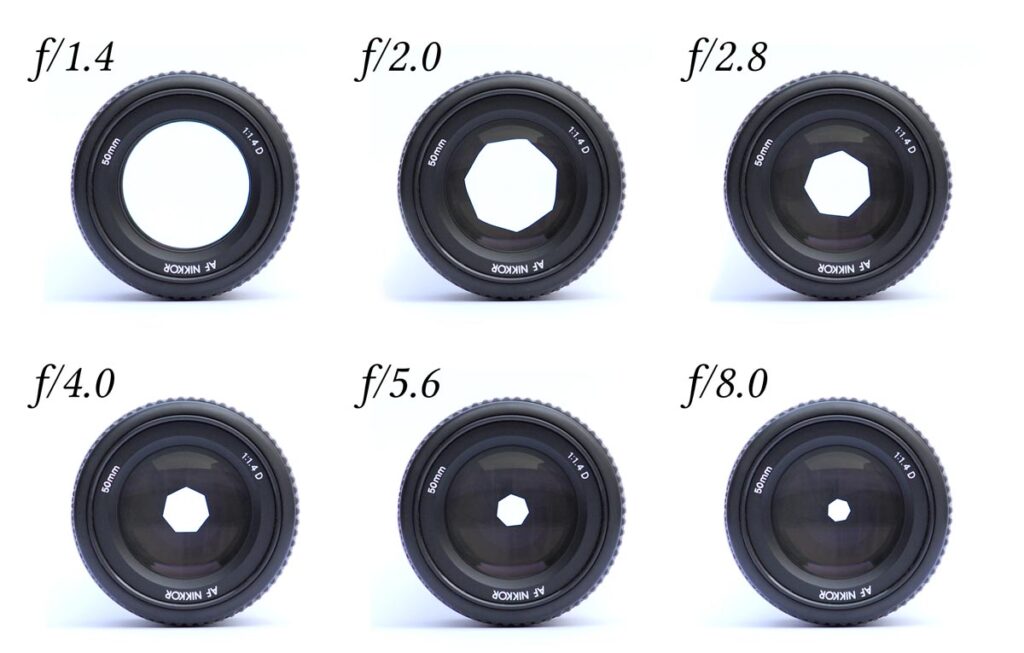
Aperture is the opening inside a camera lens that allows light to reach the camera’s sensor. It is expressed as an f-number, such as f/1.8, f/2.8, f/4, or f/8.
A smaller f-number represents a wider aperture, allowing more light to enter the camera. A larger f-number represents a narrower aperture, allowing less light to enter.
For example:
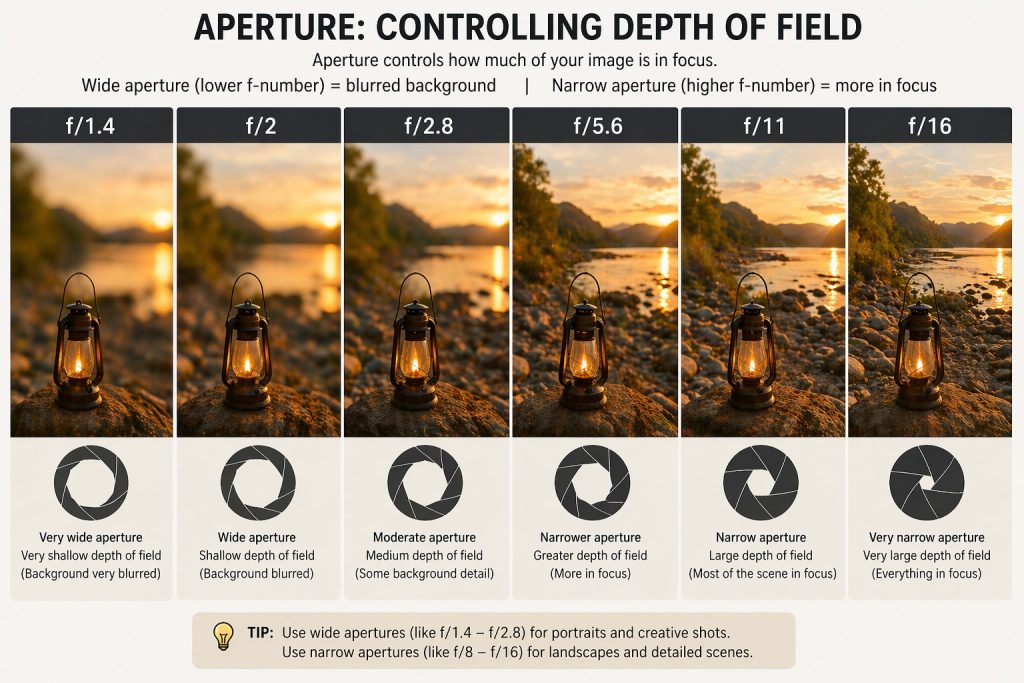
- f/2.8: Wide aperture, more light, and generally shallower depth of field.
- f/5.6: Medium aperture, less light, and generally greater depth of field.
- f/11: Narrow aperture, less light, and generally deeper depth of field.
Aperture affects two important aspects of a photograph:
- Exposure: How much light reaches the sensor.
- Depth of field: How much of the scene appears acceptably sharp.
The relationship between aperture and light is especially important when comparing full-stop and third-stop settings.
You may also like to read about the aperture blades and their utility in photography.
2. What Is a Full-Stop Aperture Setting?
A full stop represents a change in exposure by a factor of two.
When you open the aperture by one full stop, the lens allows approximately twice as much light to reach the sensor. When you close it by one full stop, the amount of light is approximately halved.
A common full-stop aperture sequence is:
f/1.4 → f/2 → f/2.8 → f/4 → f/5.6 → f/8 → f/11 → f/16 → f/22
Each step changes the amount of light by approximately one stop.
Example: Changing from f/4 to f/5.6
Suppose you are photographing a person outdoors with these settings:
- Aperture: f/4
- Shutter speed: 1/250 second
- ISO: 100
Your photograph has the correct exposure, but you want greater depth of field.
You change the aperture from f/4 to f/5.6. This reduces the amount of light reaching the sensor by one full stop.
To maintain the same brightness, you could compensate by changing the shutter speed from 1/250 second to 1/125 second, keeping ISO at 100.
The exposure remains approximately the same, but the narrower aperture generally increases depth of field.
Important: Full-stop aperture settings are easy to understand because each step doubles or halves the amount of light.
3. What Is a Third-Stop Aperture Setting?
A third-stop, also called a one-third-stop or 1/3 EV adjustment, divides one full stop into three smaller exposure increments.
Instead of jumping directly from f/4 to f/5.6, your camera can offer intermediate settings such as f/4.5 and f/5.0. This allows more precise control over exposure. A typical third-stop aperture sequence is:
f/2.8 → f/3.2 → f/3.5 → f/4 → f/4.5 → f/5 → f/5.6
The exact displayed numbers may vary slightly between camera manufacturers and rounding conventions.
Each one-third-stop adjustment changes the amount of light by a factor of approximately 1.26 in one direction or 0.794 in the other.
- Opening the aperture by one-third stop: Allows approximately 26% more light.
- Closing the aperture by one-third stop: Allows approximately 20.6% less light.
For example, changing from f/4 to f/4.5 reduces the amount of light reaching the sensor by approximately one-third of a stop, or about 20.6%.
This finer control is useful when you want to make small exposure adjustments rather than jump directly between full-stop settings.
Example: Photographing a Portrait
Imagine you are photographing a portrait in soft afternoon light.
Your initial settings are:
- Aperture: f/2.8
- Shutter speed: 1/500 second
- ISO: 100
The image is slightly too bright, but moving directly to f/4 would reduce the light by a full stop and might produce a darker image than you want.
Instead, you change the aperture from f/2.8 to f/3.2.
This reduces the light by approximately one-third of a stop. You can make a small exposure adjustment without a large jump in brightness or depth of field.
Third-stop increments are particularly useful when you want to fine-tune an exposure rather than make a large adjustment.
4. Full-Stop vs Third-Stop Aperture Settings: Key Differences
| Feature | Full-Stop Settings | Third-Stop Settings |
|---|---|---|
| Size of each adjustment | 1 full stop | 1/3 stop |
| Light change when closing the aperture | Approximately 50% less light | Approximately 20.6% less light per step |
| Light change when opening the aperture | Approximately 100% more light | Approximately 26% more light per step |
| Number of available settings | Fewer | More |
| Exposure control | Larger adjustments | Finer adjustments |
| Best suited for | Learning exposure and quick changes | Precise exposure control |
| Typical use | Basic exposure demonstrations | Portraits, landscapes, studio work |
| Example | f/4 → f/5.6 | f/4 → f/4.5 → f/5 → f/5.6 |
The main difference is not that one system produces better image quality than the other. Both use the same aperture principles.
Full-stop settings offer simplicity, while third-stop settings offer finer control.
5. Understanding Aperture Increments with a Practical Table
The following table shows a common third-stop sequence and how it relates to full-stop values.
| Full-Stop Value | Intermediate Third-Stop Values | Next Full Stop |
|---|---|---|
| f/1.4 | f/1.6, f/1.8 | f/2 |
| f/2 | f/2.2, f/2.5 | f/2.8 |
| f/2.8 | f/3.2, f/3.5 | f/4 |
| f/4 | f/4.5, f/5 | f/5.6 |
| f/5.6 | f/6.3, f/7.1 | f/8 |
| f/8 | f/9, f/10 | f/11 |
| f/11 | f/13, f/14 | f/16 |
| f/16 | f/18, f/20 | f/22 |
These values are rounded display values. The actual aperture ratio follows a mathematical relationship based on the square root of two.
For example, the aperture number increases by a factor of approximately (2^{1/6}) for each one-third-stop adjustment.
This explains why the displayed values do not increase by a constant numerical amount.
Why Does f/4 to f/5.6 Represent One Stop?
Aperture is expressed as a ratio between focal length and the diameter of the entrance pupil. Light transmission is proportional to the area of the opening, which depends on the square of its diameter.
Therefore, changing the f-number by a factor of approximately (\sqrt{2}) halves or doubles the amount of light.
For example:
- f/4 to f/5.6: approximately one stop less light.
- f/4 to f/4.5: approximately one-third stop less light.
- f/4 to f/5: approximately two-thirds stop less light.
This is why aperture increments are not evenly spaced by simple addition.
6. Practical Photography Examples
Let’s see how full-stop and third-stop adjustments work in real shooting situations.
Example 1: Portrait Photography
Suppose you are photographing a person against a distracting background.
Your starting settings are:
- Aperture: f/2.8
- Shutter speed: 1/500 second
- ISO: 100
You want to adjust the depth of field slightly while keeping the exposure close to its original level.
With full-stop settings, your next narrower option might be f/4. This is a substantial change in aperture.
With third-stop settings, you can choose f/3.2, f/3.5, or f/4.
These smaller adjustments help you find a balance between subject separation and sufficient sharpness across the face.
When to use it: Portraits, wedding photography, and close-up photography where small changes in depth of field can matter.
Example 2: Landscape Photography
Imagine you are photographing a mountain landscape and want both the foreground flowers and distant mountains to appear sharp.
Your starting settings are:
- Aperture: f/8
- Shutter speed: 1/125 second
- ISO: 100
You decide to increase depth of field by using a narrower aperture.
With full-stop increments, you move from f/8 to f/11. This reduces the light reaching the sensor by one stop.
With third-stop increments, you could instead choose f/9 or f/10 before reaching f/11.
These smaller steps let you experiment with depth of field while making more gradual exposure adjustments.
However, remember that a narrower aperture is not always better. At very small apertures, diffraction can reduce fine detail. The best aperture depends on your lens, sensor, subject distance, and desired result.
When to use it: Landscape photography, architecture, travel photography, and scenes requiring careful depth-of-field control.
Example 3: Wildlife Photography
Suppose you are photographing a bird in a tree.
Your starting settings are:
- Aperture: f/5.6
- Shutter speed: 1/1000 second
- ISO: 800
The bird’s head is sharp, but you want slightly greater depth of field to keep more of its body in focus.
You change the aperture from f/5.6 to f/6.3, reducing the light by approximately one-third of a stop.
To maintain exposure, you could increase ISO slightly or use a shutter speed that is one-third stop slower, provided subject movement allows it.
A full-stop change to f/8 would reduce the light by a full stop and might require a more substantial ISO or shutter-speed adjustment.
When to use it: Wildlife, bird photography, sports, and other situations where small exposure changes can help preserve a fast shutter speed.
Example 4: Street Photography in Changing Light
You are photographing people walking through a busy street where the light changes between sunlight and shade.
Your starting settings are:
- Aperture: f/8
- Shutter speed: 1/500 second
- ISO: 400
As you move into a darker area, the exposure becomes slightly low.
Using third-stop increments, you can open the aperture from f/8 to f/7.1 or f/6.3.
This gives you a gradual increase in light without immediately jumping to f/5.6.
If you are using aperture-priority mode, the camera may automatically compensate by adjusting shutter speed, ISO, or both, depending on your settings.
When to use it: Street photography, documentary work, travel photography, and other fast-moving environments.
7. How Full Stops and Third Stops Affect the Exposure Triangle
The exposure triangle consists of aperture, shutter speed, and ISO.
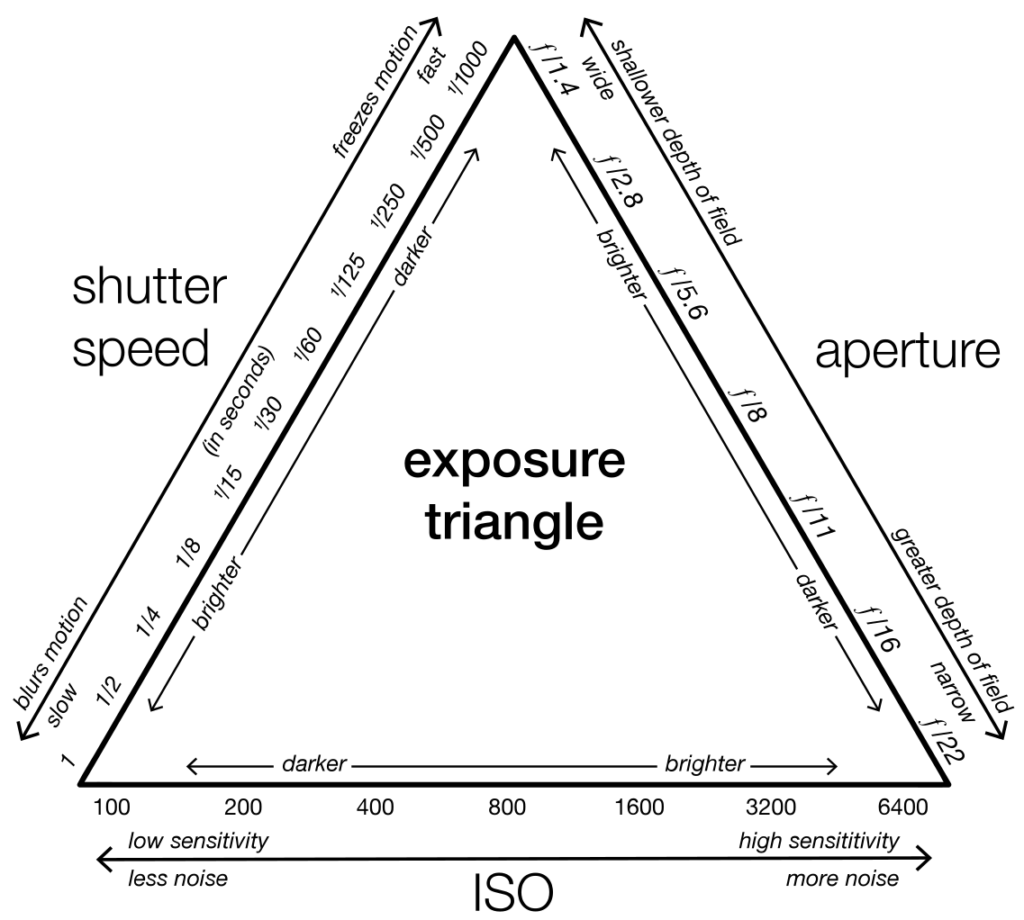
These three settings work together to control exposure, although they affect the photograph in different ways.
- Aperture affects light intake and depth of field.
- Shutter speed affects light intake and motion blur.
- ISO affects the camera’s amplification or processing of the captured signal and influences image noise.
A one-stop change in any of these settings can be balanced by an equivalent one-stop change in another setting to maintain approximately the same brightness.
Example: Maintaining the Same Exposure
Suppose your original exposure is:
- Aperture: f/4
- Shutter speed: 1/250 second
- ISO: 100
You want to use f/5.6 for greater depth of field.
Because f/5.6 allows one stop less light than f/4, you can compensate by changing the shutter speed to 1/125 second.
Alternatively, if the shutter speed must remain at 1/250 second, you could increase ISO from 100 to 200.
Both adjustments compensate for the one-stop reduction in light, though they affect motion rendering and image noise differently.
What About a Third-Stop Adjustment?
If you change the aperture from f/4 to f/4.5, the light decreases by approximately one-third of a stop.
To compensate, you could:
- Slow the shutter speed by approximately one-third of a stop.
- Increase ISO by approximately one-third of a stop.
- Combine smaller adjustments to shutter speed and ISO.
For example, a shutter speed of 1/250 second might be changed to approximately 1/200 second to compensate for the aperture adjustment.
Camera shutter-speed displays use rounded values, so the precise increment may differ slightly.
8. How to Set Full-Stop or Third-Stop Increments on Your Camera
Many DSLR and mirrorless cameras let you choose the size of exposure increments for aperture, shutter speed, and ISO.
The exact menu location varies by manufacturer and model.
Look for a setting with a name similar to:
- Exposure level increments
- Exposure compensation or exposure setting increments
- ISO sensitivity increments
- 1/3-stop or 1/2-stop increments
Some cameras offer one-third-stop and one-half-stop increments rather than full-stop increments for everyday shooting. Others let you choose the increment size separately for different exposure controls.
General Steps
- Open your camera’s menu.
- Navigate to the exposure settings or custom functions.
- Look for exposure-level increments.
- Select the available increment size you prefer.
- Return to shooting mode and check the aperture values displayed when turning the command dial.
If your camera does not provide a full-stop-only option, you can still use full-stop values manually by selecting the appropriate f-numbers.
For example, choose f/2.8, f/4, f/5.6, f/8, and f/11 when you want to work in full-stop increments.
9. Which Should You Use: Full Stops or Third Stops?
The answer depends on your shooting style and how much precision you need.
Choose Full Stops When:
- You are learning the exposure triangle.
- You want to understand how doubling or halving light works.
- You are practising manual exposure.
- You need quick, substantial changes in exposure.
- You are teaching aperture and exposure fundamentals.
Full stops make it easier to understand the relationship between aperture, shutter speed, and ISO.
Choose Third Stops When:
- You want more precise exposure control.
- You are photographing portraits and want to fine-tune depth of field.
- You need to balance aperture and shutter speed carefully.
- You are shooting in changing natural light.
- You want smaller adjustments while keeping image brightness consistent.
For most photographers, third-stop increments are a useful everyday choice because they offer flexibility without making exposure control unnecessarily complicated.
You can still think in full stops when planning an exposure, even when your camera displays third-stop increments.
10. Common Mistakes to Avoid
Mistake 1: Thinking a Smaller f-Number Means Less Light
This is one of the most common beginner mistakes.
Remember:
- f/2.8 allows more light than f/4.
- f/4 allows more light than f/5.6.
- f/8 allows less light than f/5.6.
The smaller the f-number, the wider the aperture.
Mistake 2: Assuming Every Aperture Change Is One Stop
Moving from f/4 to f/4.5 is approximately one-third of a stop, not a full stop.
Moving from f/4 to f/5.6 is approximately one full stop.
Understanding this distinction helps you predict how much exposure will change.
Mistake 3: Ignoring Shutter Speed
When you close the aperture, less light reaches the sensor. If you want the same brightness, you need to compensate with shutter speed, ISO, or a combination of settings.
However, do not slow the shutter speed so much that moving subjects become blurred.
Mistake 4: Believing Third-Stop Settings Automatically Improve Image Quality
Third-stop settings provide finer control, but they do not inherently improve sharpness, dynamic range, or image quality.
The benefit comes from choosing an aperture that better suits your subject and creative goal.
Mistake 5: Using the Narrowest Aperture for Every Landscape
Apertures such as f/16 and f/22 can increase depth of field, but diffraction may reduce fine detail.
For many landscapes, f/8 or f/11 offers a useful balance between depth of field and sharpness, although the best choice depends on the scene and equipment.
11. Quick Aperture Cheat Sheet
Use this table as a quick reference while practising photography.
| Situation | Suggested Starting Aperture | Why |
|---|---|---|
| Portrait with blurred background | f/1.8–f/2.8 | Creates shallow depth of field |
| Group portrait | f/4–f/8 | Helps keep multiple faces in focus |
| Street photography | f/5.6–f/8 | Provides a useful depth-of-field balance |
| Landscape photography | f/8–f/11 | Often balances depth of field and detail |
| Wildlife photography | f/4–f/8 | Helps balance light, shutter speed, and subject isolation |
| Macro photography | f/8–f/16 | Can help increase depth of field, depending on magnification and diffraction |
These are starting points, not rigid rules. Lens design, sensor size, subject distance, lighting, and the final image output all influence the best aperture.
12. A Simple Practice Exercise
The best way to understand full-stop and third-stop settings is to test them yourself.
Choose a stationary subject, such as a flower, a coffee cup, or a small object near a window.
Exercise A: Full-Stop Changes
- Set your camera to manual mode.
- Choose ISO 100.
- Set the aperture to f/4.
- Select a shutter speed that gives a correct exposure.
- Take a photograph at f/4.
- Change the aperture to f/5.6 and adjust the shutter speed by one stop to maintain exposure.
- Compare the two photographs.
Look for changes in depth of field and the appearance of the background.
Exercise B: Third-Stop Changes
- Keep the same subject, framing, and lighting.
- Set the aperture to f/4.
- Take a photograph.
- Change the aperture to f/4.5.
- Compensate for the small exposure change with shutter speed or ISO.
- Repeat at f/5 and f/5.6.
- Compare the photographs at the same viewing size.
Observe how gradually the depth of field and background appearance change.
For the fairest comparison, keep the camera position and focus distance fixed. If you use a tripod, it becomes easier to distinguish changes caused by aperture from changes caused by camera movement.
Note: A question may come to the present mirrorless camera users those who use electronic viewfinder (EVF) that through EVF when we can see the live view of the exposure then what is the need of aperture full stop or 1/3rd stop?
You no longer need to depend on your mental calculations to see how a change in aperture affectsthebrightness of your photograph. Your EVF can show you that in real time. However, understandingstopshelps you make deliberate exposure decisions quickly and consistently.
1. What does the EVF make unnecessary?
Suppose you are photographing a person at f/4. You change the aperture to f/5.6.
- On a traditional DSLR optical viewfinder, you generally wouldn’t see the change inexposurebrightness through the viewfinder itself.
- On a mirrorless camera, the EVF can preview the resulting brightness, provided exposure previewisenabled and the camera is operating in a suitable mode.
So, yes, your WYSIWYG observation is correct. You can often see the effect without calculating it.
But the EVF shows you the result; it doesn’t necessarily tell you whether the change is one fullstop,one-third of a stop, or how that change affects motion, depth of field and image quality.
2. Why learn full stops and 1/3 stops?
Think of stops as a unit of measurement for light, not merely a way of judging brightness.
| Aperture | Change from previous setting | Light reaching sensor |
|---|---|---|
| f/2.8 | — | Baseline |
| f/4 | −1 stop | Half |
| f/5.6 | −1 stop | Half |
| f/8 | −1 stop | Half |
| f/11 | −1 stop | Half |
Each full stop towards a larger f-number halves the light; each full stop towards a smallerf-numberdoubles it.
A one-third-stop adjustment gives you finer control. Most cameras offer such increments, although settings vary by model.
3. Is the EVF always WYSIWYG1?
Not perfectly. Exposure simulation is useful, but the preview can be misleading in certain conditions,such asflash photography, very long exposures, or when exposure simulation is disabled. The displayed brightness also depends on the viewfinder and display settings.
For critical exposure, learn to use the histogram and highlight warnings alongside the EVF.
My recommendation
For a mirrorless photographer, I would learn the following in this order:
- Full-stop aperture values — understand the relationship between f-numbers and light.
- The exposure triangle — understand how aperture, shutter speed and ISO interact.
- One-third-stop increments — learn them well enough to make precise adjustments, but do not waste time memorizing every intermediate value.
- EVF, histogram and exposure compensation — use the camera’s feedback to refine your exposure.
The key distinction is this: you no longer need to calculate exposure just to visualise brightness.Butyou still need to understand exposure to control the photograph.
In fact, the mirrorless EVF makes learning exposure easier because you can immediately of your decisions.
Conclusion
Full-stop and third-stop aperture settings are two ways of controlling how much light enters your camera.
Full-stop settings change exposure in larger increments, while third-stop settings allow smaller, more precise adjustments.
A full-stop change from f/4 to f/5.6 reduces the light by approximately half. A third-stop change from f/4 to f/4.5 makes a much smaller adjustment.
Both systems are useful. Full stops help you understand exposure quickly, while third stops give you greater flexibility when photographing subjects in challenging or changing conditions.
The most important lesson is to understand how aperture works, recognise the exposure change associated with each increment, and choose the setting that best suits your subject.
Start by practising full-stop changes to build a strong foundation. Then use third-stop increments to refine your technique and gain greater control over your photographs.
Keep practicing, compare your results, and let the scene guide your aperture choice.
- What You See What You Get ↩︎
