

White light is often described as “neutral” light—it appears colorless to the human eye. Scientifically, white light is composed of a mixture of all visible wavelengths of light, meaning it contains all the colors of the spectrum (red, orange, yellow, green, blue, indigo, and violet) combined in roughly equal intensities.
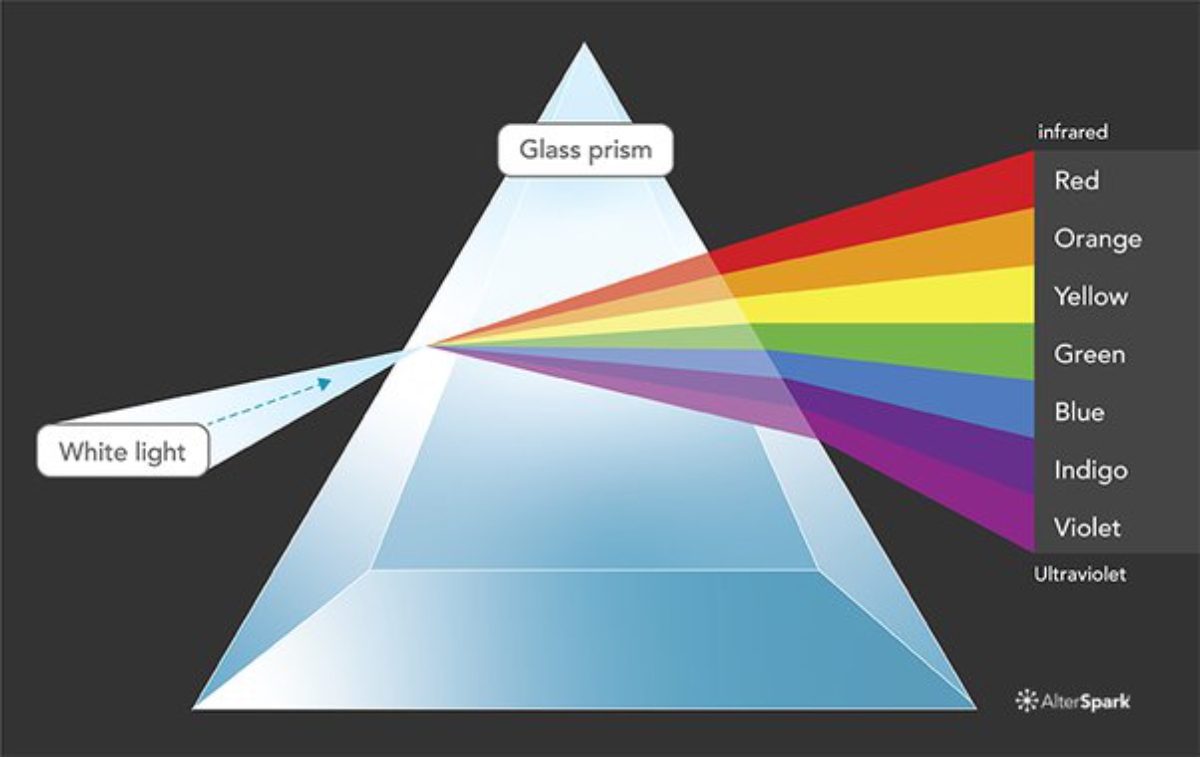
But in real-world conditions, white light doesn’t always appear purely white. Depending on the light source, it can have different “color temperatures”—some may look bluish, others yellowish, reddish, or even greenish. These color shifts are usually not noticeable to the human eye because our brains compensate for them. However, cameras capture these color shifts very clearly.
How Can White Light Appear Blue, Yellow, or Red?
Light sources emit light at different color temperatures, measured in Kelvin (K). Here’s how various light sources appear:
| Light Source | Color Temperature | Color Tint |
|---|---|---|
| Candlelight | ~1,800 K | Very warm/red |
| Incandescent bulb | ~2,800 K | Warm/yellow |
| Sunrise/Sunset | ~3,000–4,000 K | Orange to golden |
| Daylight (midday sun) | ~5,500–6,500 K | Neutral white |
| Cloudy sky/shade | ~6,500–8,000 K | Cool/blue |
| LED/fluorescent lights | ~4,000–6,500 K | Varies by bulb |
So while we might think of daylight as “white,” it can actually shift toward blue (on a cloudy day) or yellow/orange (during sunrise or sunset). These shifts create color casts in photos unless corrected.
What is White Balance?
White balance (WB) is the process of adjusting the colors in an image so that the colors look natural and neutral—especially making sure that whites actually appear white. It compensates for the color temperature of the light source, ensuring that other colors are rendered accurately.
For example:
- Under warm incandescent light, a white shirt may look orange.
- Under blue shade light, the same shirt may look blue.
Adjusting the white balance tells the camera to “neutralize” these color tints.
Why is White Balance Necessary in Photography?
Because different lighting conditions introduce different color casts, white balance is critical for:
- Color Accuracy: Ensuring that whites appear white, and other colors remain true to life.
- Consistency: Maintaining a consistent look across multiple shots taken in different lighting.
- Creative Intent: Sometimes, photographers intentionally adjust white balance to create mood (e.g., warmer for cozy scenes, cooler for dramatic effect).
Without proper white balance, your images may look off, unprofessional, or unnatural.
Examples of White Balance Settings
Most cameras offer several preset white balance modes:
| WB Setting | Intended Use Case | Effect on Image |
|---|---|---|
| Auto (AWB) | General use; camera decides | Tries to neutralize based on scene |
| Daylight | Sunny outdoor lighting | Slightly warm |
| Cloudy | Overcast conditions | Warmer than daylight |
| Shade | Shaded areas | Even warmer |
| Tungsten | Indoor lamps | Cools down warm/yellow lights |
| Fluorescent | Office lighting | Reduces green/blue cast |
| Custom/Manual | You set WB based on gray/white card | Most accurate when done correctly |






Example Scenario:
You’re photographing a bride in a white dress:
- Under golden hour sunlight (very warm light), her dress might look orange without adjustment.
- Using the Daylight or Custom WB mode corrects this so the dress appears true white.
Why Do Cameras Use Auto White Balance (AWB)?
Modern digital cameras are equipped with Auto White Balance (AWB) to estimate and correct for color casts automatically. This is helpful because:
- Lighting conditions can change quickly (e.g., moving from indoors to outdoors).
- It simplifies shooting for beginners or casual photographers.
- It works well in many standard lighting scenarios.
However, AWB can sometimes struggle:
- In scenes with strong single-color lighting (e.g., sunset or concert lighting).
- When there’s no neutral (white or gray) object in the frame for reference.
In those cases, setting WB manually or in post-processing (if you’re shooting RAW) is better.
Conclusion
White balance is a crucial yet often overlooked part of photography. It ensures that colors are rendered accurately and consistently across different lighting environments. Whether you’re a beginner using Auto White Balance or an advanced photographer setting custom WB for precision, understanding white balance will help elevate your photography significantly.
Pro Tip:
Always shoot in RAW format when possible—this allows you to change the white balance later without loss of quality.
